Our Short List of 3

- Best for: A single desk or nightstand where the tablet stays put all day.
- Aluminum alloy frame in a white finish
- Fits devices from 4 to 13 inches, including 12.9 inch iPad Pro models
- Adjustable multi-angle hinge for viewing and typing positions
- Rubber pads on the cradle and base to protect surfaces

- Best for: Heavy or cased tablets used as a second display at a desk.
- Model 90396 with dual rod support and a weighted metal base
- Aluminum construction in a silver finish
- Fits tablets and phones from 4 to 13 inches
- Ventilation hollow design with silicone padding and rubber feet

- Best for: Large tablets kept in thick protective cases.
- Aluminum body in a silver finish
- Upgraded longer support arms for greater stability
- Hollow back design for airflow and charging cable access
- Silicone pads on the hooks and back panel
All 5 Picks at a Glance
| Product | Specs | Action |
|---|---|---|
| Lamicall Adjustable Tablet Stand |
| Check price on Amazon |
| UGREEN Tablet Stand Holder |
| Check price on Amazon |
| OMOTON T2 Tablet Stand |
| Check price on Amazon |
 KABCON Tablet Stand |
| Check price on Amazon |
 Lamicall Tablet Floor Stand |
| Check price on Amazon |
Key takeaways
- Compare the best tablet stands for small homes, from fold-flat desk cradles to a tall floor stand, with fit ranges, base weights and case checks.
A tablet propped against a mug or a stack of books slides at the worst moment, and holding one through a long call or recipe leaves your arm aching. The real decision is where the tablet will live most of the time: flat on a desk, raised beside a keyboard, or floating over a couch. Each spot asks for a different base weight, hinge style and cradle depth, and the wrong match wobbles every time you tap the screen.
This guide is for people in small homes and shared rooms who use a tablet for calls, reading, drawing or kitchen viewing. The five picks below were chosen from their Amazon listing names and stated specifications, covering fold-flat desk cradles, a heavy dual-rod holder, a tall drawing stand and one floor model, so each common setup has a stand shaped for it.
Quick Picks
As an Amazon Associate we earn from qualifying purchases
| Product | Best for | Key spec from title |
|---|---|---|
| Lamicall Adjustable Tablet Stand | Everyday desk viewing and video calls | Aluminum cradle for 4 to 13 inch devices |
| UGREEN Tablet Stand Holder | Heavy tablets in thick cases | Dual rod support with weighted metal base |
| OMOTON T2 Tablet Stand | Large tablets in bulky cases | Longer arms with a hollow back design |
| KABCON Tablet Stand | Drawing and eye-level desk work | Solid aluminum build for devices up to 15 inches |
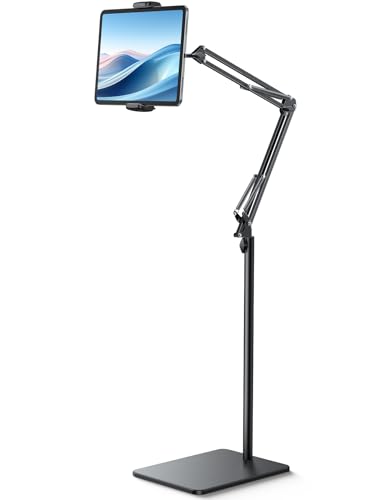
| Lamicall Tablet Floor Stand | Couch, bed and kitchen viewing | Height up to 55 inches on a 5 lb metal base |
How to Choose
Match the stand type to the room
A desk cradle suits a tablet that stays in one spot for calls and reading. A clamp or gooseneck design reaches over a bed or couch where no table exists. A floor stand with a weighted base fills the gap when the screen needs to hover beside furniture. Start by naming the one place the tablet will spend most of its hours, then shop inside that type instead of comparing every shape at once. A stand that suits its room gets used daily, while one that fights the furniture ends up forgotten in a drawer.
Check the fit range against your case
Listings state a device range, usually from 4 inches up to 12.9 or 13 inches, but that range assumes a bare tablet. A thick folio or rugged case adds depth that shallow hooks cannot grip. Measure your tablet in its case and compare the total thickness with the cradle depth in the listing. Stands with longer arms or an open hollow back tolerate bulky cases better than slim folding models. If the listing states a maximum device thickness, treat that number as the real limit for your setup.
Weigh the base, not just the tablet
Stability comes from the base, not the hinge. A stand holding a large tablet needs a weighted metal base or wide footprint, or it will rock when you tap the top corner of the screen. Light fold-flat stands are fine for smaller tablets and travel, but a heavy device on a tall setting magnifies every wobble. If you type or draw on the tablet, favour the heaviest base your space allows. The stand’s own listed weight is a useful clue, since heavier models usually carry most of that weight low in the base.
Decide how much adjustment you need
Some stands only tilt. Others add height adjustment, a rotating base, or a flexible arm. Height matters when the tablet sits beside a monitor or above a keyboard, and rotation helps when two people share a screen across a table. Every extra joint is also a point that can loosen over time, so pick the simplest mechanism that still puts the screen where your eyes want it. Note the one position you will use most, and check the mechanism reaches it without forcing.
The 5 Best Options
Lamicall Adjustable Tablet Stand
- Best for: A single desk or nightstand where the tablet stays put all day.
- Aluminum alloy frame in a white finish
- Fits devices from 4 to 13 inches, including 12.9 inch iPad Pro models
- Adjustable multi-angle hinge for viewing and typing positions
- Rubber pads on the cradle and base to protect surfaces
A single desk or nightstand where the tablet stays put all day.
It raises the tablet only slightly, so pair it with a separate keyboard tray if you need true eye-level height.
This is the straightforward desk cradle most people picture: an aluminum frame with a front hook, rubber padding where the tablet rests, and a hinge that sets the tilt from typing angle to near upright. It suits a home office or bedside table where the tablet handles calls, news and reading in one fixed spot. The weighted feel of the base keeps it planted when you tap the screen, and the white finish blends into light, minimal desks.
Watch out for: It raises the tablet only slightly, so pair it with a separate keyboard tray if you need true eye-level height.
UGREEN Tablet Stand Holder
- Best for: Heavy or cased tablets used as a second display at a desk.
- Model 90396 with dual rod support and a weighted metal base
- Aluminum construction in a silver finish
- Fits tablets and phones from 4 to 13 inches
- Ventilation hollow design with silicone padding and rubber feet
Heavy or cased tablets used as a second display at a desk.
At 760 g it is the stand you move between rooms, not the one you toss in a tote for travel days.
UGREEN builds this holder around two metal rods and a weighted base, which gives it a sturdier feel than single-arm cradles when a large tablet sits high. The support plate has a hollow ventilation design and silicone padding, and the whole stand folds down when the desk needs clearing. It fits people who run a tablet as a second screen beside a laptop, or who keep a big tablet in a protective case and need hinges that stay where they are set.
Watch out for: At 760 g it is the stand you move between rooms, not the one you toss in a tote for travel days.
OMOTON T2 Tablet Stand
- Best for: Large tablets kept in thick protective cases.
- Aluminum body in a silver finish
- Upgraded longer support arms for greater stability
- Hollow back design for airflow and charging cable access
- Silicone pads on the hooks and back panel
Large tablets kept in thick protective cases.
The single-arm design tilts only, so it cannot lift a screen up to monitor height.
The T2 answers a specific frustration: standard cradles whose short hooks let a tablet in a rugged case slide forward. OMOTON lengthened the support arms and cut a hollow opening through the back, so air reaches the tablet and a charging cable can pass while the device stays seated. The aluminum body and silicone pads keep the finish protected. It is a good match for family tablets that live in thick bumpers, and for anyone who watches long sessions on a kitchen counter.
Watch out for: The single-arm design tilts only, so it cannot lift a screen up to monitor height.
KABCON Tablet Stand
- Best for: Drawing, marking up documents and longer desk sessions.
- Solid aluminum construction in a black finish
- Adjustable holder designed for eye-level viewing and drawing
- Fits tablets and portable monitors up to 15 inches
- Listed for iPad Pro, iPad Air, iPad mini and Surface Pro models
Drawing, marking up documents and longer desk sessions.
Confirm your tablet’s width against the holder arms if you use an extra-wide rugged case.
KABCON aims at people who work on the tablet rather than just watch it. The solid aluminum build and taller eye-level posture suit drawing, annotating documents and video calls where the camera should sit closer to face height. The listing covers devices up to 15 inches, which also makes it one of the few desk stands here that can hold a portable monitor. It folds for storage, though the heavier frame marks it as a desk resident rather than a travel accessory.
Watch out for: Confirm your tablet’s width against the holder arms if you use an extra-wide rugged case.
Lamicall Tablet Floor Stand
- Best for: Hands-free viewing from a couch, bed or kitchen counter.
- Model STFT05 floor stand in a black finish
- Height adjustable up to 55 inches with a flexible arm
- 5 lb metal base for stability on the floor
- Clamp holder fits devices from 4.7 to 13 inches
Hands-free viewing from a couch, bed or kitchen counter.
Some flex is normal at full extension, so it suits watching and calls rather than typing or drawing.
When there is no desk or table to spare, this floor model puts the tablet on a pole instead. The base is a 5 lb metal plate, the height adjusts up to 55 inches, and a flexible arm with a rotating clamp head lets you swing the screen over a couch, bed or kitchen worktop. It assembles from a base, two support rods, the foldable arm and the clamp. Expect it to serve viewing first: recipes, shows and calls while your hands stay busy elsewhere.
Watch out for: Some flex is normal at full extension, so it suits watching and calls rather than typing or drawing.
Which One Fits Your Situation
Your tablet lives on a work desk
Choose between the Lamicall cradle and the UGREEN holder. The Lamicall is the simpler, lighter piece for calls and reading. The UGREEN earns its place when the tablet is heavy, cased, or raised beside a laptop screen, because the dual rods and weighted base resist the wobble that taller setups create.
Your tablet wears a thick case
Look at the OMOTON T2 first. Its longer arms were designed for exactly this problem, and the hollow back keeps a charging cable reachable. The UGREEN is the fallback if your case is both thick and heavy, since its base carries more weight without tipping. Either way, measure the case at its thickest corner, bumper included, before you commit.
You draw or take calls for hours
The KABCON stand holds the screen closer to eye level and stays firm under a stylus, which makes it the natural pick for sketching and long meetings. Its 15 inch ceiling also covers a portable monitor if your setup grows later. It also leaves both hands free for notes while the camera stays framed on you.
There is no table where you watch
The Lamicall floor stand is the only pick here that works beside a bed or sofa. Set it once, swing the arm in when you need it, and push it back against the wall when the room has to look tidy again. Its narrow footprint suits rooms where every surface already has a job.
Common Mistakes
- Buying by screen size alone and forgetting that a case adds thickness the cradle hooks must clear.
- Putting a large tablet on a light travel stand, then blaming the hinge when the whole stand rocks.
- Choosing a tilt-only desk stand when the real need is height beside a monitor or keyboard.
- Using a floor stand for typing or drawing, jobs its flexible arm was never meant to hold steady.
- Ignoring the charging port position, so the cable bends sharply or cannot reach while the tablet is mounted.
Frequently Asked Questions
Will these stands hold a tablet in its case?
Some will, but check the cradle depth rather than the headline size range. The OMOTON T2 uses longer arms made for thick cases, and the UGREEN holder handles cased devices up to 13 inches. Slim folding stands grip best on bare tablets or thin shells, so measure your case before ordering.
Can a tablet stand replace a laptop stand for desk work?
Only partly. A tablet stand raises a single screen, which is enough for calls and reading. If you type for hours with an external keyboard, a taller stand like the KABCON, or a dual-rod holder such as the UGREEN, gets the screen closer to a comfortable height.
Are floor stands stable enough for a big tablet?
A floor stand is only as steady as its base. The Lamicall floor model uses a 5 lb metal base and supports devices up to 13 inches, which handles couch and bed viewing well. Expect slight flex at full height, and avoid leaning or typing against a tablet mounted this way.
What should I check before ordering any stand?
Confirm three things from the listing: the device size range covers your tablet, the cradle or clamp fits your tablet’s thickness in its case, and the stand type matches the room. Then check the base weight if your tablet is large, since that figure decides whether taps make the screen shake.