Our Short List of 3
All 4 Picks at a Glance
| Product | Specs | Action |
|---|---|---|
 1. Logitech MX Brio — Best Overall for Video Calls | Check price on Amazon | |
 2. OBSBOT Tiny 2 — Best for Presenters Who Move Around | Check price on Amazon | |
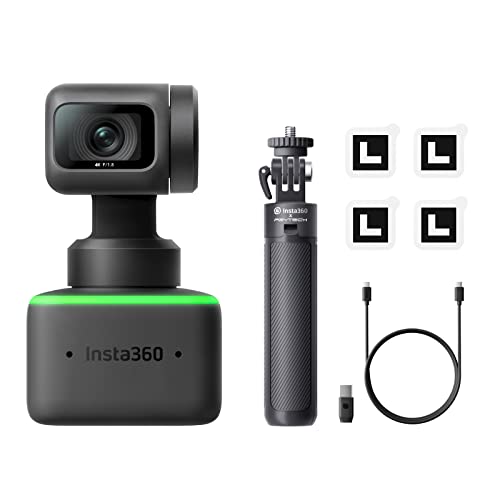
| 3. Insta360 Link — Best Gimbal Webcam for Teaching and Whiteboard Sessions | Check price on Amazon | |
 4. Logitech Brio 101 — Best Simple 1080p Pick | Check price on Amazon |
Key takeaways
- The best new webcams for work, streaming, and video calls, from 4K AI-tracking cameras to a simple 1080p pick, compared by sensor, framing, and microphones.
The best new webcams pair a large sensor with smart framing, so you look sharp on calls without a studio setup. The Logitech MX Brio leads for everyday professional calls with 4K video and a wide set of framing options, while the OBSBOT Tiny 2 and the Insta360 Link add motorized AI tracking for presenters who move around. If you want something simple, the Logitech Brio 101 covers the basics in Full HD 1080p with a built-in privacy shutter.
Disclosure: As an Amazon Associate, we earn from qualifying purchases.
Why a New Webcam Still Matters
The camera built into a laptop lid has improved, but it still sits in a thin lid with a small sensor, a fixed lens, and almost no room for a decent microphone. A current-generation external webcam changes all three of those things at once. Sensors have grown larger, which helps most in dim rooms where small sensors turn grainy. Lenses now provide adjustable fields of view, so you can frame just yourself or include a whiteboard behind you. Microphones have moved to dual beamforming arrays with noise reduction, so keyboard clicks and room echo reach the other side less often.
The other change is framing. Several current models follow you as you move, either with a motorized gimbal that physically pans and tilts or with software that crops a wide sensor image to keep you centered. That matters if you teach, present, or run workshops from your desk and you stand up or turn to a whiteboard. If you sit still for meetings all day, a fixed camera with good auto-exposure will serve you just as well, and it has fewer moving parts.
Connection type is worth checking before you buy. Newer models mostly use USB-C, while some long-running 1080p models still use USB-A. All four cameras in this guide are plug-and-play USB cameras that work with the major meeting apps, with no capture card or extra hardware in between.
The Best New Webcams at a Glance
| Webcam | Max video | Sensor | Framing | Microphones | Connection |
|---|---|---|---|---|---|
| Logitech MX Brio | 4K at 30fps, 1080p at 60fps | 8.5MP Sony STARVIS CMOS | RightSight auto-framing, 90, 78, or 65 degree field of view | Dual beamforming mics with noise reduction | USB-C |
| OBSBOT Tiny 2 | 4K, up to 60fps | 1/1.5-inch CMOS | Motorized 2-axis gimbal with AI tracking and auto zoom | Dual mics with AI noise canceling | USB-C |
| Insta360 Link | 4K at 30fps | 1/2-inch CMOS | Motorized 3-axis gimbal with AI tracking | Dual noise-canceling mics | USB-C |
| Logitech Brio 101 | Full HD 1080p | 1080p CMOS | Fixed frame | Built-in mic | USB-A |
How to Choose a New Webcam
Start with resolution, but do not stop there. A 4K sensor gives you a sharper image and room for software framing to crop in without turning soft, while 1080p is still enough for a standard meeting window. Resolution alone does not decide low-light quality, though. Sensor size matters more once the lights go down: the larger sensors in this guide gather more light per pixel, which is why a 4K camera with a large sensor can look cleaner in a dim room than a 1080p camera with a small one.
Next, think about how you move on camera. If you sit in one place, a fixed camera with autofocus and automatic light correction is simplest. If you present standing up, walk to a whiteboard, or teach a class from your desk, a gimbal camera that follows you is worth the extra complexity. The OBSBOT Tiny 2 and the Insta360 Link both do this with a motorized mount, and both add gesture control, so you can start or stop tracking with a hand signal.
Field of view is the third decision. A wide field of view fits two people or a desk setup, a narrow one keeps the frame on a single person and leaves a messy room out of shot. The MX Brio lets you switch between 90, 78, and 65 degrees, which covers both cases in one camera. Fixed cameras usually sit near 78 degrees, which frames one person at a desk with a modest amount of background.
Microphones deserve a real look, because the microphone decides whether people hear you clearly or hear your room instead. Dual-microphone arrays with noise reduction are now common, and they handle ordinary home-office noise well. If you record videos or stream, a dedicated microphone will still sound better, but for meetings the built-in microphones on the 4K picks here are a genuine step up from a laptop lid microphone.
Software is the quiet part of the decision. Logitech, OBSBOT, and Insta360 each provide a companion app for adjusting exposure, white balance, zoom, and framing presets. You do not need the app for basic calls, since every camera here works as a standard USB video device, but the app unlocks features such as Show Mode on the MX Brio and the whiteboard and desk-view modes on the gimbal cameras.
Finally, confirm the mount. All four cameras clip to the top of a monitor or a laptop lid and include a standard tripod thread, so you can put them on a small tripod or a monitor arm if the clip does not suit your setup. A heavier gimbal camera benefits from a stable mount more than a light fixed camera does, so plan the placement before you buy.
1. Logitech MX Brio — Best Overall for Video Calls
The Logitech MX Brio is the most complete webcam in this guide, and the pick to start with if you want one camera that handles meetings, streaming, and the occasional recorded video. Its headline specification is 4K Ultra HD video at 30 frames per second, with 1080p at 60 frames per second and 720p at 90 frames per second. The sensor is an 8.5-megapixel Sony STARVIS CMOS sensor, the largest sensor Logitech puts in a webcam, and the main reason the image holds up in rooms where the light is less than ideal.
Framing is where the MX Brio earns its place at the top. RightSight auto-framing keeps you centered when you shift in your chair, and you can switch the field of view between 90, 78, and 65 degrees to suit a solo call, a two-person shot, or a tighter frame. RightLight 4 adjusts exposure and white balance automatically, and Logitech’s image tuning uses AI face-based adjustments to keep skin tones natural under mixed lighting. Show Mode tilts the camera’s view down to your desk, so you can show a document or a notebook without picking the camera up.
Dual beamforming microphones with noise reduction focus on your voice and push background noise down. The camera connects over USB-C, works with Microsoft Teams, Zoom, and Google Meet, and carries a built-in privacy shutter that covers the lens when the camera is not in use. The model covered here is the Graphite version, model 960-001545, sold under ASIN B0BFJ4CRKD.
Who it suits: anyone whose working day is mostly video calls and who wants the sharpest, most flexible fixed camera available. It also adapts to a shared home office, since the adjustable field of view covers one person or two without moving the camera. The main thing to check is your USB port: the MX Brio uses USB-C, so a laptop with only USB-A ports will need an adapter or a dock.
2. OBSBOT Tiny 2 — Best for Presenters Who Move Around
The OBSBOT Tiny 2 is built for people who do not sit still on camera. It sits on a motorized two-axis gimbal, and its AI tracking follows you as you move around the room, panning and tilting to keep you framed without any input from you. That makes it the natural pick for teachers, trainers, and presenters who walk to a whiteboard or demonstrate something on a desk. The tracking includes auto zoom, so framing adjusts as you move closer or farther from the camera.
The sensor is a 1/1.5-inch CMOS sensor, the largest sensor in this guide, and that size shows in dim rooms where smaller sensors turn grainy. Video runs up to 4K, with frame rates up to 60 frames per second and HDR light correction for bright windows behind you. Autofocus keeps you sharp as you move, and gesture control lets you start or stop tracking, or zoom in and out, with a hand signal. Voice control is also built in, so you can direct the camera without touching it.
Audio comes from dual microphones with AI noise canceling, which cut steady background noise such as fans and air conditioning. The camera connects over USB-C and works as a standard USB webcam with the major meeting apps, while the OBSBOT companion software unlocks the tracking modes and whiteboard mode. The model covered here is the Tiny 2, sold under ASIN B0C3B6ZR1V.
Who it suits: presenters, teachers, and anyone who stands up or moves during calls. The gimbal is the whole point, so if you sit in one place all day, a fixed camera gives you the same image with fewer moving parts. Two practical notes: the motors make a faint sound when the camera moves, and the gimbal body is bulkier on a laptop lid than a slim fixed camera, so a small tripod is the better mount for daily use.
3. Insta360 Link — Best Gimbal Webcam for Teaching and Whiteboard Sessions
The Insta360 Link pairs a three-axis gimbal with a 1/2-inch sensor, and that combination makes it the most flexible camera in this guide for teaching. The gimbal pans, tilts, and rolls to follow you, and it can tilt straight down for an overhead desk view, which is the feature that sets it apart: you can show a notebook, a sketch, or a small object on your desk without repositioning anything. Whiteboard mode and a portrait mode round out the specialized shooting options, and gesture control lets you switch tracking on and off with a hand signal.
Video runs up to 4K at 30 frames per second, with HDR for mixed lighting and AI tracking that keeps you centered. The dual noise-canceling microphones are a clear step up from a laptop microphone, and the camera is Zoom Certified for meetings. It connects over USB-C and works as a standard USB webcam, with Insta360’s companion software providing the tracking modes, framing presets, and image adjustments. The model covered here is the Insta360 Link, sold under ASIN B0BB7N5Z97.
Who it suits: teachers, tutors, and anyone who demos things on camera. The overhead desk view and the whiteboard mode are genuinely useful in a lesson, and the three-axis gimbal moves more smoothly than a two-axis mount when you change direction. If your calls are all seated head-and-shoulders meetings, the tracking and the desk view will go unused, and a fixed 4K camera is the simpler buy. As with any gimbal camera, give it a stable mount: a small tripod keeps the overhead mode steady.
4. Logitech Brio 101 — Best Simple 1080p Pick
The Logitech Brio 101 is the straightforward camera in this guide, and that is its strength. It records Full HD 1080p video, enough for a standard meeting window, with no software to learn and no settings to manage. Plug it in over USB-A, select it in your meeting app, and it works. The built-in microphone handles ordinary calls, and a privacy shutter covers the lens when you are done.
There is no 4K, no gimbal, and no AI tracking here, and that is the point. The Brio 101 is for a desk where the camera sits in one place and the person in front of it does the same. It works with Zoom, Microsoft Teams, and Google Meet, clips to a monitor or a laptop lid, and includes a tripod thread, so it can sit on a small tripod if the clip does not suit your screen. The model covered here is the Black version, model 960-001589, sold under ASIN B0BXGFFSL1.
Who it suits: anyone who wants a reliable camera for everyday calls without features they will not use. It is also a sensible second camera for a spare room, a family computer, or a laptop that travels between home and the office, since it is light, simple, and easy to move. The things to check are the resolution and the connector: if you want 4K or you need USB-C, one of the picks above is the better fit, and if your laptop has only USB-C ports, this USB-A camera will need an adapter.
Setting Up Your New Webcam
A new webcam works best with a little attention to placement. Put the camera at eye level or just above it, roughly an arm’s length away, so the frame catches your head and shoulders. A monitor clip usually gets you there; a small tripod or a stack of books under the camera does the same job on a laptop.
Light matters more than settings. Face a window or a lamp rather than sitting with a bright window behind you, which turns you into a silhouette. If your room is dim, the larger sensors in the MX Brio and the OBSBOT Tiny 2 will cope better, but even they look better with a light source in front of you.
Sound is the third piece. Sit close enough that the camera’s microphones pick you up clearly, and keep them away from fans, keyboards, and speakers where you can. If you share a room, the noise reduction on the 4K picks helps, but a quiet corner helps more. Once the camera is placed, open your meeting app’s video settings, select the new camera, and check the preview before your first call.
Frequently Asked Questions
Is a 4K webcam worth it over a 1080p webcam for video calls?
It depends on how you use it. A 4K sensor gives you a sharper image and lets software framing crop in without the picture turning soft. For a standard meeting window, 1080p is still enough, and the sensor size and the light in your room matter more than the resolution number. If your calls are mostly seated meetings in a well-lit room, the Brio 101 covers you; if you want the sharpest image or you use framing features, a 4K pick is the better buy.
What is AI tracking, and who needs it?
AI tracking keeps you centered in the frame as you move, either by moving the camera on a motorized gimbal or by cropping a wide sensor image in software. The OBSBOT Tiny 2 and the Insta360 Link use motorized gimbals, so they keep full resolution while they follow you. It is worth having if you teach, present, or demonstrate things while standing up. If you sit in one place for every call, a fixed camera with autofocus does the same job.
Do I need a separate microphone with a new webcam?
For ordinary meetings, no. The dual-microphone arrays on the MX Brio, the OBSBOT Tiny 2, and the Insta360 Link include noise reduction and sound clearly better than a laptop microphone. A separate microphone is still worth considering if you record videos, stream, or host a podcast, where voice quality is the product. For day-to-day calls, start with the built-in microphones and add a dedicated one only if people struggle to hear you.
Will these webcams work with Zoom, Microsoft Teams, and Google Meet?
Yes. All four cameras here are standard USB video devices, so they appear as a camera choice in Zoom, Microsoft Teams, Google Meet, and other meeting apps with no capture card and no extra hardware. The companion apps from Logitech, OBSBOT, and Insta360 add framing presets and image controls, but they are optional for basic calls.
What is the difference between a gimbal webcam and a fixed webcam?
A fixed webcam stays where you point it, and any framing change comes from software cropping the image. A gimbal webcam sits on a motorized mount that physically pans and tilts to follow you, so it keeps full sensor resolution while it moves and can look down at your desk for an overhead view. Gimbal cameras suit presenters and teachers who move; fixed cameras suit seated calls, with fewer moving parts and a simpler setup.
The Bottom Line
The best new webcam for most people is the Logitech MX Brio, with 4K video, a large sensor, adjustable framing, and strong microphones in a fixed camera that simply works. Presenters who move should look at the OBSBOT Tiny 2 for its large sensor and two-axis tracking, or the Insta360 Link for its three-axis gimbal and overhead desk view. And if your calls are straightforward seated meetings, the Logitech Brio 101 covers the essentials in 1080p with nothing extra to manage. Pick the camera that matches how you spend your time on camera, check the connector against your laptop, and confirm the exact model and ASIN on the listing before you buy.