Key takeaways
- Three efficient laptops that stay cool during everyday gaming, with modest processors, solid-state storage and full HD displays, picked from Amazon listings.
A laptop that runs hot is a laptop that slows down, spins its fans and turns a gaming session into a chore, so cool running is the first thing to get right at this budget. The catch is that the cheapest way to make a laptop fast is to fit a hot, power-hungry chip, and that is exactly what a tight budget tempts makers to do. The real decision is therefore about efficiency: a modest processor that sips power and stays quiet will outlast a faster chip that throttles after ten minutes, and a machine with a solid-state drive and enough memory spends less time working hard. This list sticks to the efficient side of that trade-off.

This guide is for students, casual players and anyone who needs one laptop for school or work that also handles games without roasting their lap. Every pick below was chosen from the name and specifications on its Amazon product page, with processor efficiency, memory, storage and display given the most weight.
Quick Picks
As an Amazon Associate we earn from qualifying purchases.
| Product | Best for | Key spec from title |
|---|---|---|
| Acer Aspire 5 A515-46-R14K | Everyday play and study on a slim machine | 15.6-inch Full HD IPS display with Ryzen 3 processor |
| ASUS VivoBook 15 F512DA-EB55-SL | Light gaming with room for a large game library | Ryzen 5 processor with 128GB SSD plus 1TB hard drive |
| Acer Aspire 3 | The strongest everyday performer here for multitasking | Ryzen 5 7530U processor with 16GB RAM and 256GB SSD |
How to Choose
Put processor efficiency before raw speed
At this budget the chip decides the temperature more than any fan ever will. Modest mobile processors built for thin laptops draw far less power than the high-performance chips in dedicated gaming machines, and that lower draw is what keeps the keyboard cool and the fans quiet during a long session. A quad-core Ryzen 3 or Ryzen 5 from the efficient mobile line will run esports titles and older games smoothly while barely warming the chassis, whereas a hotter chip in the same price bracket will hit its thermal limit, slow itself down and get louder as the evening goes on. Read the exact processor code on the listing and favour the efficient mobile part over the bigger number.
Look at the cooling design you can actually check
No listing publishes a temperature chart, but several visible details tell you how a laptop sheds heat. Vents on the sides or rear beat vents on the underside, because a machine sitting on a desk can breathe while one sunk into bedding cannot. A slightly thicker chassis usually hides larger fans and more room for air to move, while the thinnest machines in this price range often have nowhere for heat to go. Raising the rear of the laptop by a centimetre or two on a stand costs nothing and drops temperatures noticeably, and keeping the vents clear of dust matters more over a year of use than any feature printed on the box.
Treat memory and storage as cooling features too
A laptop short on memory works its processor and drive harder, and that extra work becomes heat. Four gigabytes of RAM forces the system to swap data to the drive constantly, which keeps the machine busy even when the game itself is light, while eight gigabytes gives a light game room to breathe and sixteen leaves genuine headroom for a browser, chat and a game running together. Storage matters the same way: a solid-state drive loads games quickly and idles cool, a 128GB drive fills up after two large installs, and a dual-drive machine that pairs a small solid-state drive with a large hard drive keeps the system fast while the library lives on the slower disk.
Accept the display and chassis trade-offs honestly
Every laptop in this price range gives something up, and the screen is where the saving usually lands. A 15.6-inch Full HD IPS panel is the sweet spot here: large enough for games and films, sharp enough for text, and common enough that you should not settle for a smaller or dimmer display. Plastic chassis are normal at this budget and perfectly fine, though they can creak and they show fingerprints more than metal. A backlit keyboard is worth having for evening sessions, and a full-size layout with a numeric keypad suits players who also type a lot. Judge the machine as a whole rather than falling for one headline feature.
The 3 Best Options
Acer Aspire 5 A515-46-R14K
The Aspire 5 is the quiet achiever here, a slim 15.6-inch machine built around an efficient Ryzen 3 quad-core processor built for thin laptops. That modest chip is why it belongs in a cool-running roundup: it draws little power, so the chassis stays comfortable on a lap and the fans stay quiet during light games and everyday work. The Full HD IPS display keeps text and game worlds crisp, WiFi 6 covers modern home networks, and the backlit keyboard makes evening sessions practical. It suits a student or casual player who wants one dependable laptop that stays cool, stays quiet and does a bit of everything.
Specs
- 15.6-inch Full HD IPS display
- AMD Ryzen 3 3350U quad-core mobile processor
- 4GB DDR4 memory
- 128GB NVMe SSD
- WiFi 6
- Backlit keyboard
- Windows 10 Home in S mode
- Fingerprint reader
- Amazon Alexa built in
Best for: Students who need a slim everyday laptop for light games, study and video streaming.
Watch out for: Four gigabytes of memory and 128GB of storage leave little headroom, and Windows 10 Home in S mode restricts which apps can be installed, so confirm your games and software will run before ordering.
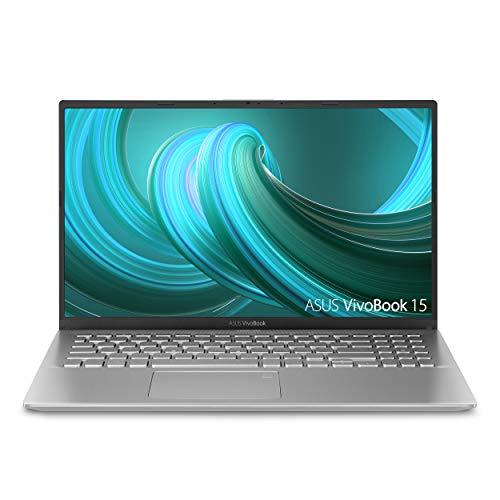
ASUS VivoBook 15 F512DA-EB55-SL
The VivoBook 15 takes a different route: a Ryzen 5 quad-core processor with Vega 8 graphics, eight gigabytes of memory, and a dual-drive setup that pairs a fast 128GB solid-state drive with a roomy 1TB hard drive. That suits a player with a real library: the system and the current favourite game sit on the fast drive while the rest of the collection lives on the hard drive. The 15.6-inch Full HD display matches the Aspire 5, and the transparent silver finish stands out from the usual black slabs. It is a slightly older design, but for light and older titles it remains a balanced, cool-running package.
Specs
- 15.6-inch Full HD display
- AMD Ryzen 5 3500U quad-core processor
- 8GB DDR4 RAM
- 128GB SSD plus 1TB HDD
- AMD Radeon Vega 8 graphics
- Windows 10 Home
- Transparent silver finish
Best for: Players with a large game library who want fast system storage and a hard drive for games.
Watch out for: The Ryzen 5 3500U is an older processor, and the 128GB solid-state drive fills quickly, so plan for games to live on the hard drive.
Acer Aspire 3
The Aspire 3 is the strongest performer here because sixteen gigabytes of memory and a Ryzen 5 7530U processor give it room the other two picks lack. Sixteen gigabytes lets a game, a browser full of tabs and a chat app run together without the machine swapping to the drive and heating up, while the 256GB PCIe solid-state drive loads games quickly and leaves room for a library. The 15.6-inch Full HD IPS display, Type-C port, WiFi 6 and backlit keyboard complete a modern specification, and Windows 11 Pro ships on this configuration. It is the machine to buy when one laptop must cover gaming, study and work without compromise.
Specs
- AMD Ryzen 5 7530U processor
- 15.6-inch FHD IPS display
- 16GB RAM
- 256GB PCIe SSD
- Type-C port
- Wi-Fi 6
- Backlit keyboard
- Windows 11 Pro
Best for: Multitaskers who keep many tabs and apps open alongside a game.
Watch out for: The Aspire 3 name covers many different configurations, so confirm the listing shows the Ryzen 5 7530U processor and 16GB of memory before ordering.
Which One Fits Your Situation
You carry one laptop to class and game in the evening
Choose the Acer Aspire 5 A515-46-R14K. Its slim shape and efficient Ryzen 3 processor keep it cool and quiet in a lecture hall and on a lap, the Full HD IPS display is easy on the eyes for reading, and the backlit keyboard covers late-night study. Just plan around the 4GB of memory and the 128GB drive, which are the tightest limits in this list.
You own a large library and hate uninstalling games
Choose the ASUS VivoBook 15 F512DA-EB55-SL. The 1TB hard drive holds a collection that would swamp a small solid-state drive, while the 128GB SSD keeps the system itself responsive. Eight gigabytes of memory and Vega 8 graphics handle light and older titles comfortably, and the dual-drive layout is the most practical storage setup at this budget.
You game with a browser, chat and music all open
Choose the Acer Aspire 3. Sixteen gigabytes of memory is the difference between a machine that juggles everything smoothly and one that stutters as it swaps data to the drive, and that smoothness also means less heat. The Ryzen 5 7530U, 256GB solid-state drive and Windows 11 Pro make it the most future-proof pick here.
Your budget is fixed and you want the most complete package
Choose the ASUS VivoBook 15 F512DA-EB55-SL. Eight gigabytes of memory, dual storage, Vega 8 graphics and a Full HD display cover every base without the tightest compromises in this list. It is the pick for a first gaming laptop bought with a firm budget and no plans to upgrade anything soon.
Common Mistakes
- Buying the fastest chip at this budget and getting a machine that throttles, slows down and roars its fans after ten minutes of play.
- Accepting 4GB of memory without a plan, then wondering why the laptop stutters with a game and a browser open together.
- Filling a 128GB solid-state drive with two large games and leaving the system no room to work.
- Gaming with the laptop sunk into bedding or a sofa, blocking the vents and cooking the machine from underneath.
- Assuming every laptop called Aspire 3 or Aspire 5 is the same machine, when the model code is what decides the processor, memory and storage.
Frequently Asked Questions
Can a laptop in this budget run modern games?
It can run esports titles, indie games and older blockbusters at modest settings, which is where most play at this budget actually happens. Modern demanding releases will only run at low settings, if at all, because these machines use integrated graphics rather than a separate graphics card. Set expectations by the games you already play, not by the newest releases.
What actually makes a gaming laptop run cool?
An efficient processor that draws little power, vents that are not blocked, and a fan design with room to move air. Keep the laptop on a hard surface, raise the rear slightly, and keep the vents clear of dust. A modest chip in a well-ventilated chassis will outlast a faster chip in a sealed thin body every time.
Is 8GB of memory enough for gaming at this budget?
Yes for light gaming alongside everyday use, and it is the sensible minimum in this list. Four gigabytes works only for one task at a time and fills quickly, while sixteen gigabytes is comfortable for multitasking. If you can only stretch to one upgrade over the life of the machine, memory is the one that matters most.
Do I need a separate graphics card?
Not at this budget, where no new laptop ships with one. The integrated graphics in these picks handle the games they are aimed at, and chasing a separate graphics card here means an older or renewed machine that usually runs hotter and carries more risk. Buy the efficient machine now and put the saving toward a stronger laptop later.