Our Short List of 3
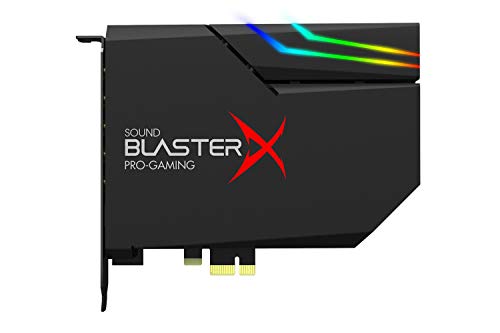
- Best for: Hi-res listening with demanding headphones.
- SABRE32-class ultra-class PCIe DAC
- Up to 32-bit/384 kHz playback
- Up to 122 dB signal-to-noise ratio
- Xamp discrete headphone bi-amp, up to 600-ohm headphones

- Best for: Balanced music listening on headphones and 5.1 speakers.
- 24-bit/192 kHz stereo playback
- 116 dB signal-to-noise ratio
- SoundCore3D audio processor
- Headphone amplifier rated to 600 ohms
- Best for: Budget upgrade from onboard audio for everyday music listening.
- 24-bit/192 kHz digital-to-analog converter
- 106 dB signal-to-noise ratio
- 5.1-channel output
- High-performance headphone amplifier
All 4 Picks at a Glance
| Product | Specs | Action |
|---|---|---|
| Creative Sound BlasterX AE-5 Plus |
| Check price on Amazon |
| Creative Sound Blaster Z |
| Check price on Amazon |
| Creative Sound Blaster Audigy Fx |
| Check price on Amazon |
 ASUS Xonar SE |
| Check price on Amazon |
Key takeaways
- Compare four PC sound cards for music listening, from a budget PCIe card to a hi-res SABRE32 board, with DAC resolution, headphone amps, and outputs matched to your setup.
The real decision when buying a PC sound card for music is not which box lists the biggest numbers. It is whether the card improves the way you actually listen: the headphones on your desk, the speakers beside your monitor, or the hi-res files in your library. A card with a strong headphone amp transforms a demanding pair of headphones, while a card with clean line outputs matters more if you already run powered speakers or an external amplifier.
This guide is for music listeners who play FLAC and other high-resolution files on a desktop PC, headphone listeners who want a stronger amp than onboard audio, and hobbyists building a dedicated music PC. Every card below is listed by the name and specifications shown on its Amazon product page, so you can check the resolution, the outputs, and the operating system support before you order.
Quick Picks
As an Amazon Associate we earn from qualifying purchases.
| Product | Best for | Key spec from title |
|---|---|---|
| Creative Sound BlasterX AE-5 Plus | Hi-res listening with demanding headphones | 32-bit/384 kHz, up to 122dB SNR |
| Creative Sound Blaster Z | Balanced music card with a 600-ohm headphone amp | 24-bit/192 kHz, 116dB SNR |
| Creative Sound Blaster Audigy Fx | Budget upgrade from onboard audio | 24-bit/192 kHz, 106dB SNR |
| ASUS Xonar SE | Simple 5.1 card for speakers and headphones | 24-bit/192 kHz, 116dB SNR |
How to Choose
Resolution and Signal-to-Noise Ratio
Resolution tells you the finest detail a card can play back, and the signal-to-noise ratio tells you how quiet its background is. A 24-bit, 192 kHz card already covers every common music file, while a 32-bit, 384 kHz card adds headroom for hi-res libraries. A higher SNR means less hiss behind quiet passages, which matters most on sensitive headphones and efficient speakers. Match the card to your library: if your files are standard streaming quality, the extra resolution of a flagship card will not change what you hear.
Headphone Amp and Impedance
Onboard audio often struggles with high-impedance headphones, and this is where a dedicated card earns its place. Check the maximum headphone impedance the card supports, such as 300 ohms or 600 ohms, and compare it with your headphones. A low output impedance, around 1 ohm, also helps the amp control the drivers cleanly. If you listen on easy-to-drive headphones or powered speakers, a powerful amp adds little, and your money is better spent on cleaner outputs or a better DAC.
Outputs and Your Setup
Think about what the card plugs into before you buy it. Analog 5.1 outputs suit a set of powered surround speakers, while an optical S/PDIF output lets you feed an external DAC or amplifier and use the card as a clean digital source. A front-panel audio header keeps your case headphone jack working, which matters if you plug in at the front of the PC. Count your spare PCIe x1 slot first, and check the card length against your case, since a card that does not fit is no upgrade at all.
Software, Drivers, and Operating System Support
A sound card is only as good as its drivers on your version of Windows. Older cards may list support for older Windows versions on their pages, so confirm current driver availability before ordering. Creative and ASUS both ship control software that adds equalizers and surround processing, which can be useful, but pure music listeners often prefer a direct stereo mode that plays the file without extra processing. Check whether the card needs an extra power connector for its lighting, and whether that lighting can be turned off.
The 4 Best Options
Creative Sound BlasterX AE-5 Plus
- Best for: Hi-res listening with demanding headphones.
- SABRE32-class ultra-class PCIe DAC
- Up to 32-bit/384 kHz playback
- Up to 122 dB signal-to-noise ratio
- Xamp discrete headphone bi-amp, up to 600-ohm headphones
Hi-res listening with demanding headphones.
Do not confuse this Plus model with the original AE-5, which lacks Dolby Digital Live and DTS, and check that your case has room for the RGB strip wiring.
The AE-5 Plus is the strongest music card in this guide, built around a SABRE32-class DAC that plays up to 32-bit, 384 kHz audio with a 122 dB signal-to-noise ratio. Its Xamp discrete headphone amplifier drives each earcup separately and supports headphones up to 600 ohms, including planar-magnetic models, which makes it the pick for listeners with demanding headphones. It also offers 5.1 discrete and 7.1 virtual surround, Dolby Digital Live, and DTS encoding for listeners who feed an external receiver or a surround speaker set.
Watch out for: Do not confuse this Plus model with the original AE-5, which lacks Dolby Digital Live and DTS, and check that your case has room for the RGB strip wiring.
Creative Sound Blaster Z
- Best for: Balanced music listening on headphones and 5.1 speakers.
- 24-bit/192 kHz stereo playback
- 116 dB signal-to-noise ratio
- SoundCore3D audio processor
- Headphone amplifier rated to 600 ohms
Balanced music listening on headphones and 5.1 speakers.
This is an older model, and new stock is scarce, with some retailers listing it only as refurbished or no longer available new, so confirm the listing is new before ordering.
The Sound Blaster Z is the balanced middle pick for music, pairing a 116 dB signal-to-noise ratio with 24-bit, 192 kHz stereo playback and a headphone amp rated to 600 ohms. Its SoundCore3D processor and SBX Pro Studio software give you an equalizer and surround controls when you want them, while the optical input and output let the card feed an external DAC. It suits a listener who wants one card for headphones and a 5.1 speaker set, with enough amp power for serious headphones without stepping up to a flagship board.
Watch out for: This is an older model, and new stock is scarce, with some retailers listing it only as refurbished or no longer available new, so confirm the listing is new before ordering.
Creative Sound Blaster Audigy Fx
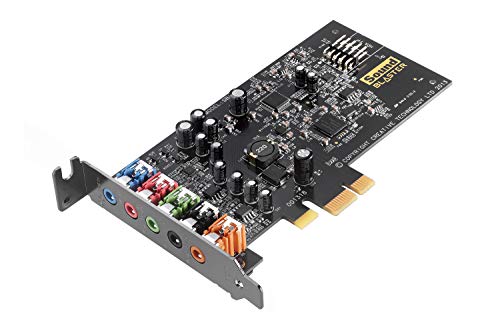
- Best for: Budget upgrade from onboard audio for everyday music listening.
- 24-bit/192 kHz digital-to-analog converter
- 106 dB signal-to-noise ratio
- 5.1-channel output
- High-performance headphone amplifier
Budget upgrade from onboard audio for everyday music listening.
The listing names older Windows versions for support, so confirm that current drivers exist for your operating system before you buy.
The Audigy Fx is the budget way to hear what a dedicated card does for music. Its 24-bit, 192 kHz DAC and 106 dB signal-to-noise ratio are a clear step up from basic onboard audio, and its high-performance headphone amp gives ordinary headphones more body and control. It also carries a microphone input and an independent line input, plus SBX Pro Studio controls for shaping the sound. It is the right pick for a listener who wants better music from a desktop PC without spending on flagship resolution or a heavyweight headphone amp.
Watch out for: The listing names older Windows versions for support, so confirm that current drivers exist for your operating system before you buy.
ASUS Xonar SE
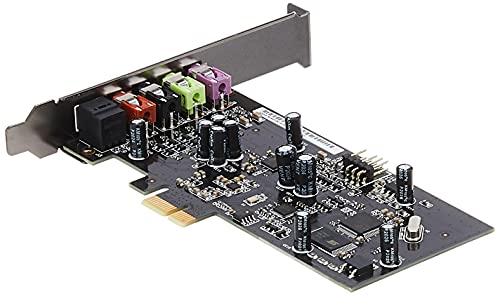
- Best for: Simple 5.1 music and film sound for speakers and headphones.
- 5.1-channel, 192 kHz/24-bit hi-res audio
- 116 dB signal-to-noise ratio
- Realtek ALC1220X codec
- Built-in 300-ohm headphone amplifier
Simple 5.1 music and film sound for speakers and headphones.
Some databases list a 120 dB figure for this card, while the Amazon title states 116 dB, and a regional variant uses a different ASIN, so confirm the exact listing before ordering.
The ASUS Xonar SE is the straightforward choice for a listener who wants clean 5.1 sound for speakers and a real headphone amp in one low-cost card. Its Realtek ALC1220X codec delivers a 116 dB signal-to-noise ratio at 24-bit, 192 kHz, and its built-in 300-ohm headphone amp drives most mid-range headphones with ease. It is a good fit for a music PC that also plays the occasional film, since the 5.1 analog outputs feed a powered speaker set directly, and the S/PDIF output covers a digital connection to an external amp.
Watch out for: Some databases list a 120 dB figure for this card, while the Amazon title states 116 dB, and a regional variant uses a different ASIN, so confirm the exact listing before ordering.
Which One Fits Your Situation
Hi-Res Files and Demanding Headphones
If your library is full of hi-res files and your headphones need real power, take the Creative Sound BlasterX AE-5 Plus. Its 32-bit, 384 kHz DAC and 122 dB signal-to-noise ratio are the best numbers here, and the Xamp amplifier handles headphones up to 600 ohms. It is the card for a listener who has already invested in headphones and wants the PC to keep up.
One Card for Headphones and Speakers
For a desk where headphones and a 5.1 speaker set share one PC, the Creative Sound Blaster Z is the balanced pick. Its 116 dB ratio and 600-ohm amp cover serious headphones, while the optical output feeds an external DAC if you add one later. Just confirm the listing is new stock, since this older model is getting harder to find.
A First Step Up From Onboard Audio
If you only want music to sound clearly better than onboard audio without a big spend, the Creative Sound Blaster Audigy Fx is the right start. Its 24-bit, 192 kHz playback and headphone amp lift ordinary headphones and powered speakers, and the SBX controls let you shape the sound. Check driver support for your Windows version first.
A Simple Card for a Speaker Setup
When the goal is clean sound for a set of powered 5.1 speakers with a headphone jack for late-night listening, the ASUS Xonar SE does the job with the least fuss. Its 300-ohm amp covers most headphones, and the analog outputs connect straight to your speakers. Confirm the 116 dB listing, since other sources quote a different figure.
Common Mistakes
- Buying a flagship 32-bit card when your music files and headphones cannot reveal the difference, and spending the budget on resolution you will never hear.
- Choosing a card with a weak headphone amp for high-impedance headphones, then wondering why the music sounds thin and quiet.
- Forgetting to check for a free PCIe x1 slot and enough case clearance before ordering an internal card.
- Installing an older card without checking that current drivers exist for your version of Windows.
- Leaving surround processing on for stereo music, which can smear the imaging of a well-recorded track.
Frequently Asked Questions
Do I need a sound card if my motherboard already has audio?
Not always. Modern onboard audio is fine for easy headphones and basic speakers. A dedicated card earns its place when your headphones are high impedance, when you hear hiss or interference from onboard audio, or when you want hi-res playback above standard streaming quality. If none of those apply, better headphones or speakers will change the sound more.
What does 24-bit, 192 kHz mean for music listening?
It describes the resolution of the digital audio the card can play: 24-bit depth and a 192 kHz sample rate. Most music is sold at lower rates, and a 24-bit, 192 kHz card already covers every common file. Higher figures like 32-bit, 384 kHz add headroom for hi-res libraries, but they only matter if your files and your ears can use them.
Can a sound card drive 600-ohm headphones?
Some can, and this guide names them. The Sound BlasterX AE-5 Plus and the Sound Blaster Z both list headphone amps rated to 600 ohms, while the ASUS Xonar SE is rated to 300 ohms. Check your headphones’ impedance first, then match it to the card’s rating, and remember that a low output impedance also helps the amp control the drivers.
Should I use the card’s surround processing for music?
Usually not. Stereo music is recorded for two channels, and surround processing can blur the imaging and the placement of instruments. Use the card’s direct stereo mode for music, and save the surround and enhancement settings for films and games. An equalizer is the more useful tool for music, since it lets you correct your headphones or your room.