Key takeaways
- Four-bay NAS enclosures for small office storage compared on network ports, memory, expansion and the features a shared office drive actually needs.
A small office outgrows shared folders on one person’s PC the moment a second employee needs the same file, and a four-bay NAS is the usual answer: one box on the network that everyone can reach, with room for drive redundancy. The real decision is not the bay count, which is fixed by the search, but the network hardware behind it. Port speed decides how fast the office can pull files, memory decides how many services the box can run at once, and expansion options decide whether the unit still fits in three years.
These picks are for offices of five to twenty-five people who need shared storage, workstation backup targets and basic file services without a server room. Every unit below is a genuine four-bay network-attached enclosure with Ethernet ports — not a USB direct-attached box — and each was selected from the processor, memory, network and expansion details on its Amazon listing. All four are sold diskless, so drives are a separate line in the budget.
Quick Picks
As an Amazon Associate we earn from qualifying purchases.
| Product | Best for | Key spec from title |
|---|---|---|
| Synology DS923+ | Offices that may expand beyond four bays | 4-bay NAS expandable to 9 bays, 4GB ECC memory |
| QNAP TS-464-8G-US | Fast shared access and media-friendly extras | Dual 2.5GbE ports, 8GB memory, HDMI output |
| Synology DS423 | Straightforward shared storage on a budget of effort | 4-bay diskless NAS with dual 1GbE ports |
| TerraMaster F4-424 Pro | The most processor and memory headroom | Core i3-N305 8-core CPU with 32GB DDR5 |
How to Choose
Prioritise network ports over almost everything
A NAS feeds the whole office through its Ethernet ports, so those ports are its true speed limit. Dual 1GbE ports, as on the Synology units here, serve a small team comfortably for documents and backups. Dual 2.5GbE ports, fitted to the QNAP and TerraMaster picks, move large files noticeably faster once your switch and cabling support the speed, and they extend the useful life of the box. Before paying for faster ports, confirm your office switch can match them; a 2.5GbE NAS behind a gigabit switch runs at gigabit speed. For most small offices, port speed matters more day to day than any processor benchmark.
Give memory and processor a realistic workload
File serving alone asks little of a NAS, which is why the DS423 works with 2GB of memory. Add office-wide backup jobs, photo libraries, surveillance recording or several simultaneous users and the workload changes character. ECC memory, fitted to the DS923+, protects against silent data corruption and suits a box that becomes the office’s record keeper. The F4-424 Pro’s 8-core processor and 32GB of DDR5 are aimed at offices that will run applications and containers on the NAS itself. Buy for the services you will actually switch on, not the longest feature list, but leave headroom if the box is hard to replace later.
Plan the drive layout before the hardware arrives
Four bays invite RAID 5 or an equivalent single-parity layout, giving you three drives of usable space with survival of one failure. Offices keeping irreplaceable records should consider a mirrored pair arrangement or budget for the DS923+’s expansion path to nine bays with an add-on unit. NVMe slots, present on the DS923+ and TS-464, accept fast cache or a separate flash volume for the files everyone opens constantly. Decide the layout on paper first: changing RAID arrangements after data lands on the array usually means wiping it and starting again.
Remember a NAS is not a direct-attached drive
Everything in this guide connects by Ethernet to your router or switch and serves files over the network; none of them plug into a single PC by USB as working storage. That distinction matters if you arrived here wanting a backup box for one workstation — a direct-attached enclosure is the simpler tool for that job. A NAS earns its place when several people, or several machines running overnight backups, need the same storage at the same time, reachable even when any one computer is switched off.
The 4 Best Options
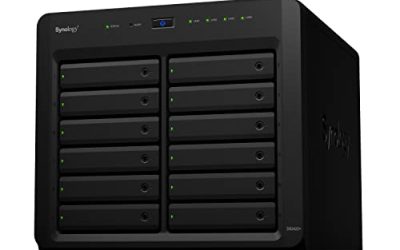
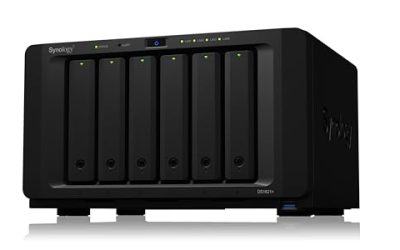
Synology DS923+

The DS923+ is the considered choice for an office that expects to grow. Its AMD Ryzen R1600 processor and 4GB of ECC memory — expandable to 32GB — give it the stability profile of a small server, and two M.2 NVMe slots allow fast cache or flash volumes alongside the four main bays. The decisive feature is expansion: with a DX517 unit it grows to nine bays, so an office can start with four drives and scale without replacing the NAS. Twin 1GbE ports are its modest point, adequate for documents and backups though not the fastest here.
Specs
- Processor: AMD Ryzen R1600, dual-core
- Memory: 4GB DDR4 ECC, expandable to 32GB
- Drive bays: 4, diskless
- Network: 2 × 1GbE RJ-45 ports
- NVMe: 2 × M.2 NVMe slots
- Expansion: Up to 9 bays with DX517 expansion unit
Best for: Offices that want one NAS to last through real growth, with ECC memory guarding the company archive.
Watch out for: Network ports are 1GbE only, so if your office switch and cabling already run faster, this is not the box that exploits them.
QNAP TS-464-8G-US

QNAP’s entry is the connectivity pick. Dual 2.5GbE ports, two USB 3.2 Gen 2 ports, an HDMI output and a PCIe Gen3 x2 slot for later expansion make it the most connectable unit in this guide, and its quad-core Intel Celeron processor with 8GB of DDR4 — expandable to 16GB — runs office services comfortably. Two M.2 2280 slots take NVMe drives for cache or fast storage. For an office that moves large files daily, briefs a meeting-room screen from the NAS, or wants the option to add faster networking later, this is the flexible option.
Specs
- Processor: Intel Celeron quad-core, burst up to 2.9GHz
- Memory: 8GB DDR4, expandable to 16GB
- Drive bays: 4, diskless
- Network: 2 × 2.5GbE ports
- NVMe: 2 × M.2 2280 PCIe Gen3 slots
- Expansion: PCIe Gen3 x2 slot
- Ports: 2 × USB 3.2 Gen 2, HDMI output
Best for: Offices with large shared files and a fast local network that the NAS should actually keep up with.
Watch out for: The feature set is broad, and small teams may never use the HDMI output or expansion slot they are paying for.
Synology DS423

Not every office needs applications and expansion; some need a dependable shared drive that everyone can reach and nobody has to think about. The DS423 is that machine. A quad-core Realtek RTD1619B and 2GB of memory are modest on paper and sufficient for file sharing, scheduled workstation backups and photo storage for a small team, with capacity up to 72TB across its four bays. Twin 1GbE ports and two USB 3.2 Gen 1 ports cover the essentials. Buy it for simplicity, and judge it on reliability rather than headroom.
Specs
- Processor: Realtek RTD1619B, quad-core
- Memory: 2GB DDR4
- Drive bays: 4, diskless
- Network: 2 × 1GbE ports
- Ports: 2 × USB 3.2 Gen 1
- Maximum capacity: Up to 72TB
Best for: Small teams that want shared storage and backup targets with the least possible administration.
Watch out for: The fixed 2GB of memory leaves little room to add services later, so growing offices should look at the DS923+ instead.
TerraMaster F4-424 Pro

The F4-424 Pro brings the strongest raw hardware in this guide: an 8-core Intel Core i3-N305 processor and 32GB of DDR5 memory, a specification closer to a small server than a storage appliance. Dual 2.5GbE ports feed that power to the network properly. It suits offices that intend to run real workloads on the NAS — multiple backup jobs, media libraries, business applications — rather than treat it as a passive file shelf. If your plans for the box extend beyond storage, this is the headroom pick, and the four diskless bays accept the drives your capacity plan calls for.
Specs
- Processor: Intel Core i3-N305, 8 cores
- Memory: 32GB DDR5
- Drive bays: 4, diskless
- Network: 2 × 2.5GbE ports
Best for: Offices that will run applications and heavy backup schedules on the NAS, not just store files on it.
Watch out for: The hardware outruns basic needs, so offices wanting simple shared folders will pay for capacity they never use.
Which One Fits Your Situation
Your office will outgrow four bays
The Synology DS923+ is the only pick designed to grow with you, expanding to nine bays with a DX517 unit and to 32GB of memory as demands rise. Its ECC memory also suits a NAS that becomes the permanent home of company records. Start with four drives, add the expansion when the business does, and avoid a forklift replacement later.
Large files move around your office all day
Choose the QNAP TS-464-8G-US. Dual 2.5GbE networking, NVMe slots and a PCIe expansion slot give it the throughput path design, media and engineering files need, provided your office switch and cabling support the faster standard. The HDMI output is a genuine bonus for offices that present directly from stored material in meeting rooms.
You want storage the office can forget about
The Synology DS423 is the low-maintenance answer: enough power for sharing and backups, a simple specification, and nothing extra to administer. For a small team whose current system is a shared folder on a desktop PC, it is a clear, calm step up that does not demand an IT department.
The NAS will run services, not just store files
Take the TerraMaster F4-424 Pro. With an 8-core processor and 32GB of DDR5, it has the resources to run daily backup suites, media services and office applications simultaneously without the storage role suffering at all. Buy this one when the NAS is joining your real infrastructure, not just your filing system.
Common Mistakes
- Confusing a NAS with a USB backup enclosure and expecting to plug it into one PC as a working drive.
- Installing four mismatched spare drives instead of matched drives sized for the RAID layout you planned.
- Paying for 2.5GbE ports while the office switch only supports gigabit, leaving the extra speed permanently unused.
- Treating RAID inside the NAS as a backup and keeping no separate copy of critical company data anywhere else.
- Placing the NAS somewhere hot, dusty or publicly accessible because it is a small box that is easy to tuck away and forget.
Frequently Asked Questions
How is a NAS different from a plug-in external drive?
A NAS connects to your network by Ethernet and serves files to every authorised user and device at once, independently of any single computer. An external drive connects to one machine and is only available through it. Offices choose NAS storage precisely because the shared drive stays online when individual PCs are shut down.
Which RAID level suits a four-bay office NAS?
A single-parity layout such as RAID 5 is the common default: it uses three drives for data and survives one drive failure. Offices prioritising simplicity and rebuild speed sometimes mirror two pairs instead. Either way, choose before loading data, because changing the arrangement later generally means erasing the array.
Do these NAS enclosures include hard drives?
No. All four listings are diskless, so you buy drives separately and should budget for them alongside the enclosure. NAS-rated drives in matched capacities are the standard choice for an array that runs around the clock, and the per-bay capacity limits on each listing tell you the largest drives supported.
Can a small office NAS also back up our workstations?
Yes — scheduled backup of office PCs to the NAS is one of its standard roles, and the models here have the memory and network capacity for overnight jobs from several machines. Keep at least one further copy of critical data off the NAS as well, since a backup that shares a building and a network with the originals is only partial protection.