Key takeaways
- Five small-form-factor gaming desktops picked for simulation games: the CPU, RAM, VRAM and storage headroom flight, racing and city sims actually need.
Simulation games load a PC differently from shooters or action titles. A flight simulator is constantly streaming terrain, weather and air traffic while its physics model leans hard on the processor. A city builder grows until every citizen, vehicle and delivery route is being simulated at once. A racing sim wants high, steady frame rates at the exact moment the car is surrounded by rivals. All three also install enormous world and scenery files, so storage fills faster than most players expect. The five desktops below were chosen with those demands in front: processor strength, memory headroom, graphics memory, and room for growing sim libraries, all in cases far smaller than a full tower.
Our top pick: the Corsair ONE i500 — the strongest processor and graphics card in this group, with 64GB of memory and a 2TB SSD, in a compact liquid-cooled tower.
Runner-up: the ASUS ROG G22CH DB779 — a desktop-class RTX 4070 and 32GB of memory in a true 10.8-litre case.
Every pick below was chosen from the specifications published on its Amazon listing — processor, graphics card, memory, storage and case dimensions as listed — rather than from any testing programme of our own. One distinction matters throughout this guide: two of these machines use laptop graphics chips. That is stated plainly in their sections, because a laptop RTX 4070 is not the same part as a desktop RTX 4070.
Quick Picks
As an Amazon Associate we earn from qualifying purchases.
| Product | Best for | Key spec |
|---|---|---|
| Corsair ONE i500 | Flight sim headroom | i9-14900K, RTX 4090, 64GB, 2TB SSD |
| ASUS ROG G22CH DB779 | Balanced small case | i7-13700KF, desktop RTX 4070, 32GB, 1TB SSD |
| Minisforum AtomMan G7 Ti | Processor-first rigs | i9-14900HX 24 cores, RTX 4070 Laptop, 32GB |
| ASUS ROG NUC 970 | Smallest footprint | Core Ultra 9 185H, RTX 4070 Laptop, 3 M.2 slots |
| MSI Trident AS 12TG-031US | Desktop GPU, upgrade path | i7-12700F, desktop RTX 3060 Ti, 16GB |
How to Choose a Small Gaming Desktop for Simulation Games
Put the processor first, not the graphics card
Most game guides lead with the graphics card, but simulation titles are often limited by the processor. Flight sims run their world simulation on a small number of threads, so per-core speed matters as much as core count, while city builders and busy racing grids use the extra cores for traffic, physics and background systems. A strong recent processor with high clock speeds is the foundation; the graphics card can only draw what the simulation has already calculated. Every pick here uses a processor that can feed its graphics card properly in sim workloads.
Treat 32GB of memory as the working standard
Simulation games are memory-hungry in a way most genres are not. Large scenery areas, long traffic chains and big saved worlds all sit in RAM, and a machine that runs short starts swapping to the drive mid-session. Four of the five desktops here ship with 32GB or more. The one 16GB machine is included because its memory can be upgraded, and its section says so openly — if you play heavily modified flight or city sims, plan that upgrade from the start rather than treating the stock configuration as final.
Count storage in terabytes, and check the spare slots
A single flight simulator with add-on scenery can grow past the size of several ordinary games combined, and racing and city sims with content libraries are not far behind. A 1TB drive is workable; 2TB is comfortable. Just as important is what happens when the drive fills: two picks here have spare internal SSD slots, which is a far cleaner expansion path than an external drive dangling off a compact case. Check the slot count before you buy, not after the library outgrows the machine.
Know whether the graphics card is a desktop or laptop part
In small cases, some manufacturers fit laptop graphics chips to save space and heat. They carry the same model names as desktop cards but deliver less performance and, in this group, less graphics memory. That trade can be worth it for the smallest footprints, but it should be a conscious choice. This guide labels every laptop GPU where it appears, and the two machines with desktop cards are identified just as clearly, so the comparison stays honest.
The 5 Best Options
1. Corsair ONE i500

The ONE i500 is the headroom pick: the strongest hardware in this group, in a case Corsair positions as roughly a third smaller than a full-sized desktop. The processor is a liquid-cooled Intel Core i9-14900K and the graphics card is a liquid-cooled desktop GeForce RTX 4090, backed by 64GB of DDR5 memory and a 2TB M.2 SSD. For a flight simulator at high settings — especially across multiple monitors, where the graphics card is rendering several views of a detailed world at once — that combination has the most spare capacity here, and the 64GB of memory gives large scenery caches room to breathe. The wood front panel also makes it the one machine in this group that looks like furniture rather than equipment.
Specs
- Processor: Intel Core i9-14900K, liquid-cooled
- Graphics: NVIDIA GeForce RTX 4090 (desktop), liquid-cooled
- Memory: 64GB Vengeance DDR5
- Storage: 2TB M.2 SSD
- Case: 15.47 in H × 7.36 in W × 11.81 in D, wood front panel
Best for: Flight-sim pilots running high settings or multi-monitor setups who want the most headroom in a compact case.
Watch out for: It is the largest chassis in this group, at roughly 21 litres — small beside a full tower, but not a mini PC. Several i500 configurations share the model name with lesser graphics cards and memory, so confirm the listing in front of you is the 14900K / RTX 4090 / 64GB / 2TB build before ordering.
See the Corsair ONE i500 on Amazon
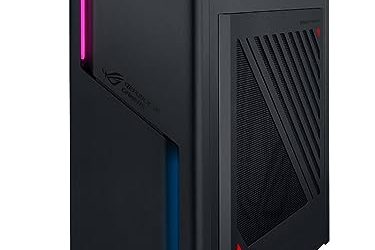
2. ASUS ROG G22CH DB779

The G22CH is the balanced pick, and the one that best matches what “small-form-factor” usually means: a 10.8-litre case, 8.4 kg, holding a desktop GeForce RTX 4070 with 12GB of graphics memory. The processor is an Intel Core i7-13700KF, memory is 32GB of DDR5 out of the box, and storage is a 1TB PCIe Gen 4 SSD. That specification reads like it was aimed at this exact guide — a desktop-class graphics card rather than a laptop part, the full 32GB sim players want, and a case small enough to sit beside a monitor or under a desk shelf. For racing sims at 1440p and flight sims at sensible settings, it covers the brief without asking for upgrades on day one.
Specs
- Processor: Intel Core i7-13700KF
- Graphics: NVIDIA GeForce RTX 4070 (desktop), 12GB
- Memory: 32GB DDR5
- Storage: 1TB PCIe Gen 4 SSD
- Case: 115 × 323 × 286.9 mm, 8.4 kg, Windows 11
Best for: Sim players who want a desktop graphics card and 32GB of memory in a genuinely compact case, with nothing to upgrade immediately.
Watch out for: This is a 2023 model, and near-identical G22CH variants with a different processor and 16GB of memory circulate under other listings — check that the page shows the DB779 specification above, particularly the 32GB of memory.
See the ASUS ROG G22CH DB779 on Amazon
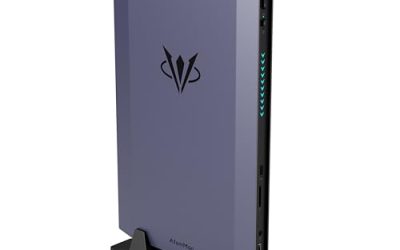
3. Minisforum AtomMan G7 Ti

The AtomMan G7 Ti is the processor-first pick. Its Intel Core i9-14900HX brings 24 cores and 32 threads at up to 5.8 GHz — the highest core count in this group — which suits simulation workloads that spread physics, traffic and background systems across whatever cores are available. Memory is 32GB of DDR5 and the 1TB SSD sits alongside a second SSD slot, so a growing scenery library has somewhere to go. The honest trade is the graphics: the RTX 4070 here is the laptop version with 8GB of graphics memory, in a slim vertical mini-PC chassis. It handles sim titles well at moderate settings, but it is not a desktop 4070 and this guide will not pretend otherwise.
Specs
- Processor: Intel Core i9-14900HX, 24 cores / 32 threads, up to 5.8 GHz
- Graphics: NVIDIA GeForce RTX 4070 Laptop GPU, 8GB
- Memory: 32GB DDR5
- Storage: 1TB SSD, 2 SSD slots in total
- Connectivity: HDMI 2.1, USB4, WiFi 7
Best for: Players whose sims are processor-bound — busy city builders, traffic-heavy flight sims — and who value the second SSD slot for scenery storage.
Watch out for: The graphics chip is a laptop part with 8GB of graphics memory, so high-resolution flight sim work will reach its limits sooner than the desktop-card picks. A barebone version of this model, sold without memory, storage or an operating system, circulates under the same name; this listing is the complete 32GB / 1TB system.
See the Minisforum AtomMan G7 Ti on Amazon
4. ASUS ROG NUC 970

The ROG NUC 970 is the smallest machine here by a wide margin: a 2.5-litre chassis that still holds 32GB of DDR5 memory and, unusually, three M.2 SSD slots in total — one populated by its 1TB drive, two free for expansion. That makes it the best internal storage story in this group for players whose sim libraries keep growing. The processor is an Intel Core Ultra 9 185H, and the graphics are again a laptop RTX 4070 with 8GB of GDDR6 memory, stated plainly. In a chassis this small that is the expected compromise: it is a capable 1080p and lighter 1440p sim machine that disappears onto a desk or behind a monitor, rather than a high-settings flight-sim rig.
Specs
- Processor: Intel Core Ultra 9 185H
- Graphics: NVIDIA GeForce RTX 4070 Laptop GPU, 8GB GDDR6
- Memory: 32GB DDR5
- Storage: 1TB PCIe Gen 4 SSD, 3 M.2 2280 slots in total (2 free)
- Case: 2.5-litre chassis
Best for: Space-limited desks and racing-sim setups where the smallest footprint matters and extra SSD slots will be used as the library grows.
Watch out for: The laptop graphics chip sets the ceiling here — demanding flight sims at high settings are beyond what this class of GPU is for. Because this model is sold in several regional variants, confirm on the product page that the machine in front of you is the Core Ultra 9 185H / 32GB / 1TB configuration described here.
See the ASUS ROG NUC 970 on Amazon
5. MSI Trident AS 12TG-031US

The Trident AS is the value end of this group, and it earns its place honestly: a desktop GeForce RTX 3060 Ti with 8GB of graphics memory in a 10.36-litre case, driven by a 12-core Intel Core i7-12700F at up to 4.9 GHz, with a 1TB SSD and WiFi 6E. For 1080p and 1440p racing sims and older or lighter flight titles, that is a workable specification. The caveat is memory: it ships with 16GB of DDR4, which is the floor for modern simulation games rather than a comfortable amount. MSI specifies memory support up to 64GB, so the sensible plan is to treat a memory upgrade as part of the purchase if your sims run large worlds or heavy add-ons.
Specs
- Processor: Intel Core i7-12700F, 12 cores, up to 4.9 GHz
- Graphics: NVIDIA GeForce RTX 3060 Ti (desktop), 8GB
- Memory: 16GB DDR4 (2 × 8GB), motherboard supports up to 64GB
- Storage: 1TB SSD
- Case: 10.36 litres (396.57 × 137.06 × 410.39 mm), WiFi 6E, Windows 11 Home
Best for: Players starting out in racing or lighter flight sims who want a desktop graphics card in a small case and are willing to upgrade the memory later.
Watch out for: The 16GB of stock memory is this pool’s floor for simulation games — heavily modified sims will want more, so budget the upgrade path into your thinking. This is also a 2022 model, a generation behind the other picks.
See the MSI Trident AS 12TG-031US on Amazon
Which One Fits Your Situation
You fly with multiple monitors or maximum scenery detail
Choose the Corsair ONE i500. Multi-monitor flight sim work multiplies the rendering load while the world simulation keeps the processor busy, and the i500 is the only pick with clear headroom on both sides — the strongest processor and graphics card here, 64GB of memory, and the largest standard SSD for the scenery library itself.
You want one balanced machine and no immediate upgrades
Choose the ASUS ROG G22CH DB779. A desktop RTX 4070, 32GB of memory and a 1TB SSD in a 10.8-litre case is the specification most sim players actually need, and nothing in it has to be changed on arrival. It is the pick that fits the widest range of flight, racing and city sim use.
Your desk space is the real constraint
Choose the ASUS ROG NUC 970 if every litre counts, or the Minisforum AtomMan G7 Ti if you need more processor cores in a still-slim machine. Both use laptop graphics chips — that is the trade for the footprint — but both keep 32GB of memory and provide spare SSD slots, which are the two things sim players feel first after the graphics ceiling.
You are starting out and plan to grow into the hobby
Choose the MSI Trident AS, with the memory caveat understood. Its desktop graphics card and 12-core processor cover current racing sims and lighter flight titles, and the memory ceiling of 64GB leaves a clear upgrade step when your sim worlds get bigger. Buy it as a starting point, not as a finished high-end rig.
Common Mistakes
Assuming a laptop GPU matches the desktop card of the same name. An RTX 4070 Laptop GPU and a desktop RTX 4070 share a name, not a performance level. Two picks in this guide use the laptop part, and they are labelled every time — check which one a listing contains before comparing machines by name alone.
Buying 16GB of memory for a heavily modified sim. Add-on scenery, traffic packs and large city saves all consume RAM. A 16GB machine can run modern sims, but it is the floor, not the target; either choose a 32GB pick or plan the upgrade.
Ignoring storage until the drive is full. Sim installs grow quietly — a base game, then scenery, then aircraft or track packs. Running out of space mid-library is the most common small-form-factor regret. Prefer a 2TB drive or a machine with a free internal SSD slot.
Comparing case sizes by the word “compact”. The picks here range from 2.5 litres to roughly 21 litres, all sold as small machines. Measure your space and compare the actual dimensions or litre figures rather than the marketing word.
Choosing by graphics card alone. In simulation games the processor frequently sets the frame rate, especially in busy scenes. A balanced machine with a strong processor will feel faster in a crowded city or a full traffic pattern than a lopsided one with a bigger card and a weaker chip.
FAQ
Is 32GB of RAM really necessary for simulation games?
For light, unmodified titles, 16GB will run. For the way most sim players actually play — add-on scenery, traffic, large saved worlds, a browser and voice chat alongside — 32GB is the comfortable working amount, and it is what four of these five machines ship with. Treat 16GB as a starting point with an upgrade planned, not as the finished specification.
Are laptop GPUs in these desktops a problem?
They are a trade, not a defect. A laptop RTX 4070 gives up performance and graphics memory against the desktop card in exchange for a much smaller, cooler case. For 1080p sims and moderate settings that trade is reasonable; for high-resolution flight sim work it is the first limit you will meet. The picks here label the chip type in every case so the choice is yours.
How much storage do simulation games need?
Plan in terabytes. A flight simulator with scenery and aircraft add-ons, or a racing sim with a full content library, can occupy several hundred gigabytes on its own, and libraries only grow. A 1TB drive is the practical minimum in this group; a 2TB drive or a free internal M.2 slot — the NUC 970 has two free slots — saves an early upgrade.
Can a small-form-factor PC handle a flight simulator at high settings?
The top of this group can. The Corsair ONE i500 pairs the strongest processor here with a desktop RTX 4090 and 64GB of memory, which is high-end hardware by any measure — the case is simply smaller and liquid-cooled. The smaller laptop-GPU picks are aimed at moderate settings instead, and their sections say so.