Key takeaways
- Compare the best 6-bay NAS enclosures for small office storage, with picks from Synology, QNAP and Asustor covering RAID headroom, 2.5GbE and backup tools.
Buying a 6-bay NAS for a small office is rarely about raw capacity. The real decision is how the box behaves in year three: whether a failed drive can be rebuilt without taking the file share offline for a weekend, whether backups of every workstation actually finish overnight, and whether the unit still has empty bays when the archive outgrows your first set of disks. Six bays earn their keep through RAID flexibility and staged growth, not through a bigger number on the front panel.
This guide is for office managers replacing an aging file server, small teams centralizing project folders and workstation backups, and growing businesses that want one on-site copy they fully control. Every model below is a true 6-bay desktop enclosure, and each was chosen from the specifications and features stated on its Amazon product page.
Quick Picks
As an Amazon Associate we earn from qualifying purchases.
| Product | Best for | Key spec from title |
|---|---|---|
| Synology DiskStation DS1621+ | Offices that want the strongest backup software suite | AMD Ryzen quad-core CPU with dual M.2 NVMe cache slots |
| QNAP TS-664-8G-US | Teams upgrading to faster office networking | Dual 2.5GbE ports and dual M.2 PCIe slots |
| Asustor Lockerstor 6 Gen2 AS6706T | Buyers who want the most NVMe slots in this size | Four M.2 NVMe slots with dual 2.5GbE |
| QNAP TS-653D-8G | Smaller offices that mainly need dependable file sharing | Intel Celeron quad-core with dual 2.5GbE ports |
How to Choose
Plan the RAID layout before counting terabytes
Six bays change the maths of redundancy. With four bays, RAID 6 eats half your disks; with six, the same two-drive fault tolerance leaves four drives of usable space, and RAID 5 keeps five drives working while still surviving one failure. Decide which failure you are protecting against first, then size the drives. A six-bay unit also lets you start with four disks and add the remaining pair later, spreading the purchase across two budget years instead of forcing one large outlay on day one.
Match the network ports to your switch, not your hopes
A NAS can only move files as fast as its Ethernet ports allow. Units with dual 2.5GbE ports, like the QNAP and Asustor picks here, need a 2.5GbE-capable switch before anyone sees a difference over gigabit. The Synology DS1621+ ships with four 1GbE ports and reaches faster speeds only after a 10GbE card goes into its PCIe slot. Check what your office switch actually supports, and budget for the card or switch upgrade in the same purchase if faster transfers are the point.
Weigh CPU and RAM against the jobs you will really run
Basic file serving asks very little of a processor, but a small-office NAS rarely stops there. Workstation backup agents, snapshot schedules, photo indexing, a mail archive, or a lightweight virtual machine all compete for the same CPU and memory. Quad-core chips are the floor in this class. RAM matters just as much: a model with memory already at its ceiling, or soldered in place, cannot grow with your software list, while ECC memory on the Synology guards against silent data corruption in long-running arrays.
Separate cache slots from storage bays
M.2 NVMe slots decide how responsive a hard-drive array feels under several simultaneous users. Every model in this guide accepts NVMe cache drives without sacrificing a 3.5-inch bay, but the counts differ sharply: two slots on the Synology and both QNAP units, four on the Asustor. Remember that cache accelerates repeated reads and small-file work; it does not raise your total capacity, and a cache pair is not a substitute for a proper backup stored somewhere other than this one box.
The 4 Best Options
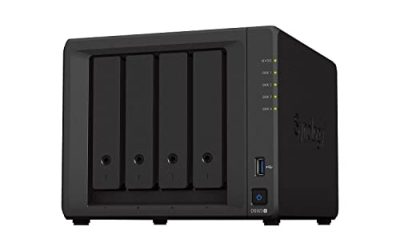
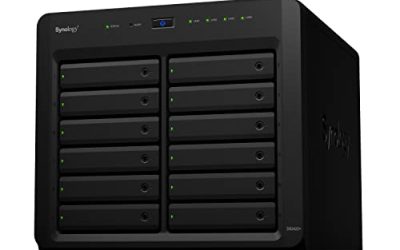
Synology DiskStation DS1621+

The DS1621+ is the pick for offices that treat the NAS as their backup hub rather than a simple shared folder. Its listing highlights Synology’s Active Backup suite, Hyper Backup and Snapshot Replication, which together cover workstation images, server backups and scheduled off-site copies. The AMD Ryzen V1500B quad-core processor and ECC memory suit an array that stays powered on for years, and the chassis can grow from six drives to sixteen by adding two DX517 expansion units, the longest runway in this group.
Specs
- 6 drive bays for 3.5-inch or 2.5-inch SATA drives, diskless
- AMD Ryzen V1500B quad-core 2.2 GHz processor with AES-NI encryption
- 4GB DDR4 ECC SODIMM memory, expandable up to 32GB
- 4 x 1GbE LAN ports
- 2 x M.2 2280 NVMe slots for SSD cache
- PCIe expansion slot for an optional 10GbE network card
- Scales to 16 drives with two DX517 expansion units
Best for: Offices that want workstation and server backup handled by the NAS software itself.
Watch out for: Networking is gigabit until you buy the 10GbE add-in card, and Synology’s drive compatibility list is stricter than its rivals.
ASIN: B08HYQJJ62
QNAP TS-664-8G-US

The TS-664 is built for the office that has already wired for 2.5GbE or plans to. Two 2.5GbE ports come fitted as standard, so a compatible switch unlocks noticeably quicker large-file transfers without any internal upgrades. Its Intel Celeron quad-core processor bursts to 2.9GHz, and the twin M.2 PCIe slots accept NVMe drives for cache acceleration or a separate fast storage pool for the files your team opens constantly. A PCIe slot stays free for a future 10GbE card, giving this mid-sized box a clear second stage.
Specs
- 6 drive bays for 3.5-inch SATA hard drives or 2.5-inch SSDs, diskless
- Intel Celeron quad-core processor, burst up to 2.9GHz
- 8GB DDR4 RAM, on-board and non-expandable
- Dual 2.5GbE (2.5G/1G/100M) network ports
- 2 x M.2 PCIe Gen 3 x2 NVMe SSD slots
- PCIe expansion slot for upgrades such as a 10GbE card
- 2 x USB 3.2 Gen 2 (10Gbps) ports
Best for: Small teams moving big files daily across a 2.5GbE office network.
Watch out for: The 8GB of memory is fixed on-board, so heavy virtual-machine or container plans will hit a ceiling you cannot lift.
ASIN: B0BPNCJHNZ
Asustor Lockerstor 6 Gen2 AS6706T

The AS6706T stands out on flash: four M.2 NVMe slots, double what the other enclosures here offer, which suits offices juggling a large shared media library or many small project files that benefit from aggressive caching. Its Intel Celeron N5105 quad-core processor and dual 2.5GbE ports match the QNAP TS-664 on everyday pace, and the memory can be raised from 8GB to 16GB as your software list grows. An HDMI output is an unusual extra in this class, handy for a dashboard display or direct media playback in a meeting room.
Specs
- 6 drive bays for 3.5-inch or 2.5-inch SATA drives, diskless
- Intel Celeron N5105 quad-core CPU
- 8GB DDR4 RAM, expandable up to 16GB
- 4 x M.2 NVMe SSD slots
- Dual 2.5GbE LAN ports, upgradable via PCIe expansion
- HDMI output
- 2 x USB 3.2 Gen 2 ports
Best for: Offices with heavy shared-file traffic that want maximum SSD caching room.
Watch out for: Confirm the exact regional variant before ordering, because a newer v2 revision of this model is also sold with different network ports.
ASIN: B09VX449JG
QNAP TS-653D-8G

The TS-653D is the oldest design in this roundup, and that is precisely its appeal for a small office that wants proven, uncomplicated hardware. The Intel Celeron J4125 quad-core processor and the full 8GB memory configuration handle shared folders, scheduled backups and user account management without drama. Dual 2.5GbE ports keep it current with modern switches, and a PCIe slot remains available if a 10GbE card is ever needed. It lacks M.2 slots, so it suits offices whose workload is steady file serving rather than cache-hungry applications.
Specs
- 6 drive bays for 3.5-inch SATA drives, diskless
- Intel Celeron J4125 quad-core 2.0 GHz processor, burst up to 2.7 GHz
- 8GB DDR4 SO-DIMM memory (maximum 8GB)
- Dual 2.5GbE (2.5G/1G/100M) network ports
- PCIe Gen 2 expansion slot
- 2 x USB 3.2 Gen 1 ports and 3 x USB 2.0 ports
Best for: Small offices that want a mature, straightforward file server with modern network ports.
Watch out for: This listing is the 8GB configuration of an older model line, so check the seller and variant carefully and confirm current availability before committing.
ASIN: B0896YVN5L
Which One Fits Your Situation
A small team sharing project files all day
Choose the QNAP TS-664 or the Asustor AS6706T. Both arrive with dual 2.5GbE ports and NVMe cache slots, the two features that decide how a shared drive feels when five people open large documents at once. Pick the Asustor if your work is many small files that benefit from its four cache slots, and the QNAP if you prefer its storage-pool flexibility for a dedicated fast volume.
One box responsible for every office backup
Take the Synology DS1621+. Its bundled Active Backup suite is designed to pull images from workstations and servers without separate per-machine software purchases, and Snapshot Replication adds quick rollbacks after accidental deletions or ransomware scares. The four gigabit ports are fine for overnight backup windows, and ECC memory is the right foundation for an archive you intend to trust for years.
An office still on a gigabit network
Any model here will serve files today, but the DS1621+ and TS-653D make the most sense. The Synology’s four 1GbE ports support link aggregation on a managed switch, while the QNAP TS-653D keeps dual 2.5GbE ready for the day the switch is replaced. Avoid paying for cache-heavy configurations until the network can feed them; spend first on drives and a second backup copy instead.
Room to grow without replacing the unit
The DS1621+ has the clearest growth path: expansion units take it to sixteen drives, RAM rises to 32GB, and a 10GbE card can be added later. The TS-664 is the alternative if your growth is about speed rather than bays, since its free PCIe slot and M.2 storage pools let performance scale while the six internal bays stay as they are.
Common Mistakes
- Buying six large drives at once when starting with four in RAID 6 and adding a pair later would spread the cost and keep a hot spare path open.
- Assuming a NAS is a backup by itself; a single enclosure, however redundant its RAID, still needs an off-site or cloud copy of anything the business cannot lose.
- Pairing a 2.5GbE NAS with a gigabit switch and cabling, then blaming the NAS when transfer speeds never improve.
- Filling every bay immediately and leaving nowhere for a replacement drive to rebuild onto when the first disk fails.
- Mixing random desktop drives into an office array instead of NAS-rated drives built for continuous multi-bay vibration and 24/7 duty.
Frequently Asked Questions
How many drives should a small office start with in a 6-bay NAS?
Four drives is the practical starting point. That allows RAID 6, which survives two simultaneous drive failures, while leaving two bays free for later expansion or a hot spare. Offices with lighter needs can begin with three drives in RAID 5, but the empty bays are the real advantage of the 6-bay format, so plan the array around having somewhere to grow.
Is 2.5GbE worth it over standard gigabit for office storage?
It is worth it when several staff move large files daily and the office switch supports 2.5GbE; transfers of design files, disk images and video can finish roughly twice as fast as gigabit in real use. If the team mostly edits small documents, gigabit remains adequate, and money is better spent on larger drives or an off-site backup subscription first.
Can one of these NAS units replace our cloud storage subscription?
It can replace the storage portion, giving the office fast local access and a fixed hardware cost instead of a growing monthly bill. It should not replace the off-site element of your backup plan, though. Most offices run the NAS as the primary store and keep an encrypted cloud or rotated external copy for fire, theft and ransomware protection.
Do these enclosures include hard drives?
No. All four models in this guide are sold diskless, as their listings state, so the drives are a separate purchase. Budget for NAS-rated hard drives in matched capacities, since the array will run at the size and speed of its smallest, slowest member. Buying drives from different production batches is a sensible precaution against simultaneous failures.