Key takeaways
- Find the best 12-bay NAS enclosures for small office storage, with diskless desktop and rackmount picks, RAID protection, and fast networking for shared files.
Introduction
A small office generates files faster than most teams expect. Contracts, invoices, design drafts, client photos, video clips, backups, and shared folders pile up week after week, and a single external drive or a desktop computer used as a file server soon becomes a bottleneck. A 12-bay NAS enclosure gives a small office a central place for all of that material, with room to grow, protection against a failed drive, and access for everyone on the local network.
The enclosures in this guide are diskless units. That means the enclosure itself ships without hard drives installed, and the buyer chooses the drives separately. This keeps the choice of drive capacity, drive type, and RAID layout in the hands of the office, rather than locking the team into a fixed bundle. Twelve bays is a large amount of room for a small office, and that is exactly the point. An office can start with a handful of drives, add more as the archive grows, and still have spare bays for a second storage pool, a backup volume, or a replacement drive.
This guide covers how to choose a 12-bay NAS enclosure and four diskless enclosures that fit the brief, suited to shared files, backups, and everyday office workloads. The focus stays on practical points: bay count, processor and memory, networking speed, RAID support, form factor, software, and expansion. Before choosing, think about how the office works: how many people will open files at once, how large the files are, whether the NAS will become the backup destination, and whether the office has a rack, a shelf, or only a desk corner.
How to Choose a 12-Bay NAS Enclosure for a Small Office
Start with the bay layout. All four enclosures here have twelve bays, but the bay mix can differ. Some units use twelve 3.5 inch bays for hard drives. Others mix 3.5 inch bays with smaller 2.5 inch bays for solid state drives. An office that stores mainly large files will use 3.5 inch hard drives for capacity. An office that wants faster access for a smaller set of active files may value solid state drive bays or M.2 slots for caching. Check the drive sizes each bay accepts, and check whether the enclosure supports hot swapping, so a failed drive can be replaced without shutting the whole unit down.
Processor and memory come next. A NAS enclosure is a small computer, and its processor handles file sharing, user permissions, backups, snapshots, and any apps that run on the unit. A quad-core processor is a sensible baseline for a small office with several users working at once. Four gigabytes of memory can handle basic file sharing and backups, while eight gigabytes or more gives the unit more headroom for multiple users, virtual machines, containers, and background tasks. Memory that can be expanded later is useful, because an office can start modestly and add memory when workloads grow.
Networking speed is often the real limit in a small office. A NAS with only Gigabit Ethernet ports can still serve documents and routine backups well, but large video files and multi-user access benefit from faster networking. Dual 2.5 Gigabit Ethernet ports allow link aggregation and faster transfers when the office switch and cabling support it. Units with built-in 10 Gigabit Ethernet ports suit offices that move very large files every day. Before paying for faster networking on the NAS, check the switch, the router, and the cabling in the office. A fast NAS connected through a slow switch will still move at the speed of the slowest link.
RAID support protects the office against a single drive failure. RAID 5 spreads data and parity across several drives and survives one failed drive. RAID 6 survives two failed drives and suits larger arrays where a rebuild takes longer. RAID 10 combines mirroring and striping for a balance of speed and protection, at the cost of usable capacity. Choose a RAID level before buying drives, because the level decides how many drives are needed and how much usable capacity remains after protection. RAID is not a backup by itself. A separate backup copy, on another device or in another location, remains essential.
Form factor decides where the enclosure lives. Desktop tower units sit on a shelf, under a desk, or on a sturdy table, and they suit offices without a server rack. Rackmount units, usually 2U high, slide into a standard rack and suit offices that already have rack space, a network cabinet, or a small server room. Rackmount units often include redundant power supplies, which keep the unit running if one power supply fails. Measure the space first, including depth, ventilation, and access to the front bays.
Noise, heat, and power draw matter in a small office because the NAS often sits near people. A unit with large, slow fans tends to run quieter than a unit with small, fast fans. Twelve drives generate heat, so the enclosure needs steady airflow and a clear path for warm air to leave. Place the unit where air can move freely, away from direct sunlight and away from a heater.
Software is the part of a NAS that the team touches every day. The operating system controls shared folders, user accounts, permissions, remote access, backups, snapshots, and apps. A clear web interface and support for common backup tools make daily use far simpler. Expansion is the last point to check: some enclosures accept an expansion unit that adds another set of bays, while others accept a faster network card, extra memory, or an M.2 drive for caching.
Top Picks
Synology DiskStation DS2422+

The Synology DiskStation DS2422+ is a 12-bay desktop NAS enclosure built around a quad-core AMD Ryzen V1500B processor and 4 GB of ECC DDR4 memory that can be expanded to 32 GB. It is a diskless unit, so the office chooses its own drives. The twelve bays accept 3.5 inch drives, and the enclosure supports hot swapping. The unit runs Synology DiskStation Manager, a widely used NAS operating system with shared folders, user permissions, backups, snapshots, and a broad set of apps for file sharing and office work.
Networking on the DS2422+ uses four Gigabit Ethernet ports, which support link aggregation for combined throughput and for redundancy if one link fails. The unit has no built-in 10 Gigabit Ethernet port, so offices that need that speed would add a network card through the expansion slot or choose a different model.
The DS2422+ measures 270 mm high by 300 mm wide by 340 mm deep and weighs 9.5 kg without drives. It fits on a sturdy shelf or side table, and it can be expanded to 24 bays with one DX1222 expansion unit, making it a strong fit for a small office that wants a central file server and a backup destination that can grow.
TerraMaster T12-423

The TerraMaster T12-423 is a 12-bay desktop NAS enclosure aimed at small and medium businesses. It uses an Intel Celeron N5095 quad-core processor running at 2.0 GHz with a turbo speed of 2.9 GHz, and it ships with 8 GB of DDR4 memory that can be expanded to 32 GB. The unit is diskless, with twelve bays for 3.5 inch SATA hard drives and support for 2.5 inch SATA drives and solid state drives as well. Maximum raw capacity is listed as 240 TB when twelve 20 TB drives are installed, which shows how much headroom the twelve bays provide.
Networking uses two 2.5 Gigabit Ethernet ports, which support link aggregation for combined bandwidth. The enclosure also includes an M.2 slot for an NVMe solid state drive used for SSD caching, which can speed up access to frequently used files. RAID support includes Single, JBOD, RAID 0, RAID 1, RAID 5, RAID 6, and RAID 10, so the office can choose a layout that balances capacity and protection.
The T12-423 measures 334 mm by 163 mm by 295 mm, a compact footprint for a 12-bay desktop unit, and it uses three fans to keep drives cool during continuous operation. That mix of a quad-core processor, 8 GB of memory, and dual 2.5 Gigabit networking makes it a practical choice for a small office that wants fast shared storage without a rackmount chassis.
QNAP TS-1264U-RP-8G-US
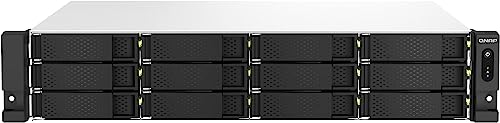
The QNAP TS-1264U-RP-8G-US is a 12-bay rackmount NAS enclosure for offices that already have a rack or a network cabinet. It is a 2U unit with twelve bays for 3.5 inch SATA hard drives or 2.5 inch SATA solid state drives, and it ships diskless. The processor is an Intel Celeron N5095 quad-core chip, and the unit includes 8 GB of DDR4 memory. An M.2 slot is included for SSD caching, and the enclosure runs the QNAP QTS operating system with shared folders, snapshots, backups, and virtualisation support.
Networking uses two 2.5 Gigabit Ethernet ports, which support link aggregation and give the unit a faster path to the office network than a single Gigabit link. The rackmount design includes two 300W redundant power supplies, so the unit can keep running if one power supply fails. That redundancy is a meaningful feature for an office that depends on the NAS during working hours and cannot afford a shutdown while a part is replaced.
The TS-1264U-RP measures about 482.6 mm wide by 423.8 mm deep by 88.7 mm high and weighs 9.43 kg without drives. It fits a standard rack, keeps cabling tidy, and gives easy front-bay access for drive changes, combining twelve bays, redundant power, and faster networking in a form factor built for continuous use.
TerraMaster U12-423

The TerraMaster U12-423 is the rackmount counterpart to the desktop T12-423, and it suits a small office that wants twelve bays in a 2U rack chassis. It uses an Intel Celeron N5095 quad-core processor and is listed with 4 GB of DDR4 memory. The unit is diskless, with twelve bays for 3.5 inch and 2.5 inch SATA drives, and it includes two 2.5 Gigabit Ethernet ports for faster network access and link aggregation. An M.2 slot is included for NVMe SSD caching.
The U12-423 runs the TerraMaster operating system with support for shared folders, backups, snapshots, and common file sharing protocols including SMB, NFS, FTP, and iSCSI. RAID support covers the standard layouts used in small offices, including RAID 5 and RAID 6. For an office that already has a rack, it is a straightforward way to add a large central store without taking up desk or shelf space.
| Product | Key Feature | Best For |
|---|---|---|
| Synology DiskStation DS2422+ | 12 bays, quad-core Ryzen processor, 4 GB ECC memory expandable to 32 GB, four Gigabit ports | Offices that want a mature software platform and a desktop unit that can expand to 24 bays |
| TerraMaster T12-423 | 12 bays, Intel Celeron N5095, 8 GB memory, dual 2.5 Gigabit ports, M.2 caching | Desktop offices that want faster networking and a compact 12-bay tower |
| QNAP TS-1264U-RP-8G-US | 12 bays, 2U rackmount, redundant power supplies, dual 2.5 Gigabit ports | Offices with a rack that need redundant power and easy front-bay access |
| TerraMaster U12-423 | 12 bays, 2U rackmount, Intel Celeron N5095, dual 2.5 Gigabit ports | Offices with a rack that want a straightforward 12-bay central store |
Buying Guide
Start with capacity planning. List the data the office already holds, then add a realistic allowance for growth over the next two to three years. Usable capacity depends on the RAID level. RAID 6 reserves the equivalent of two drives for parity, so a twelve-drive array still leaves ten drives of usable space. RAID 5 reserves one drive. RAID 10 reserves half of the raw capacity. Plan the drive count and the RAID level together, and leave at least one or two bays empty for future growth or for a hot spare drive that can take over automatically if a drive fails.
Choose drives made for NAS use. NAS hard drives are designed for continuous operation, vibration from neighbouring drives, and long rebuild times. Match drive capacities within a single storage pool where possible, because mixed capacities can reduce usable space or complicate expansion. Check the enclosure maker’s drive compatibility list before buying, especially for larger capacities, and confirm that the drives use the SATA interface the bays accept.
Set up user accounts and permissions before the whole team starts using the NAS. Create a shared folder for each department or project, give access only to the people who need it, and use groups rather than individual permissions where possible. Turn on snapshots if the system supports them, so an accidentally deleted or overwritten file can be restored from an earlier point in time. Snapshots are not a backup, but they are a fast way to undo a mistake.
Plan backups as a separate step from RAID. A common approach is to keep the working copy on the NAS, a second copy on another device in the office, and a third copy off site or in cloud storage. The NAS can act as the backup destination for laptops and desktops, and it can also back itself up to an external drive or a second NAS.
Think about the network before installation day. A 12-bay NAS with 2.5 Gigabit ports needs a switch that supports 2.5 Gigabit speeds to use that speed. If the office still uses an older Gigabit switch, the NAS will still work, but it will run at Gigabit speed until the switch is upgraded. Place the switch and the NAS close together and label the cables.
Consider noise and placement too. A desktop unit near a desk will be heard during the day, especially when drives spin up or a rebuild runs. A rackmount unit in a ventilated cabinet is easier to live with. Leave space around the unit for air to move, keep the front bays clear, check warranty and support, and keep a spare drive on hand if the office depends on the NAS every day.
Frequently Asked Questions
How many drives should a small office install in a 12-bay NAS enclosure on day one?
Start with the number of drives the chosen RAID level needs, plus enough capacity for current data and near-term growth. Many offices start with four to six drives in RAID 5 or RAID 6, leaving spare bays for later expansion.
Is a diskless 12-bay NAS enclosure a good fit for a small office?
Yes, for most small offices it is a good fit. A diskless enclosure lets the office choose drive capacity and drive type, rather than accepting a fixed bundle. Twelve bays give a large amount of headroom, so the office can start small and add drives as the archive grows, without replacing the enclosure.
Does a small office need 10 Gigabit networking on a 12-bay NAS?
Not always. Document sharing, email archives, and routine backups work well over Gigabit or 2.5 Gigabit networking. Offices that move large video files, large design files, or multi-user project folders every day will benefit from faster networking, but the switch, cabling, and client computers must support that speed as well.
What is the difference between a desktop and a rackmount 12-bay NAS enclosure?
A desktop unit sits on a shelf or table and suits an office without a rack. A rackmount unit, usually 2U high, slides into a standard rack and suits an office with a network cabinet or server room. Rackmount units often include redundant power supplies and front-facing bays, while desktop units are usually quieter and easier to place in a small room.
Conclusion
A 12-bay NAS enclosure is a long-term investment for a small office. It centralises files, protects them with RAID, supports backups and snapshots, and gives the team a single place to find shared material. The four enclosures in this guide cover the main choices a small office faces: a desktop unit with a mature software platform in the Synology DS2422+, a compact desktop unit with faster networking in the TerraMaster T12-423, and two rackmount units in the QNAP TS-1264U-RP-8G-US and the TerraMaster U12-423 for offices that already have a rack.
Choose the form factor first, then match processor, memory, and networking to the way the office works. Plan the RAID level and the drive count together, leave room to grow, and set up backups as a separate step from RAID. With those choices made, a 12-bay enclosure can serve a small office for years, growing bay by bay as the archive grows.
Disclosure: As an Amazon Associate, we earn from qualifying purchases.