Our Short List of 3

- Best for: creators who carry one compact PC between a home desk and a studio desk.
- CPU: Intel Core Ultra 9 275HX (Series 2)
- GPU: NVIDIA GeForce RTX 5070 Mobile, 8GB, dedicated
- RAM: 32GB DDR5-6400
- Storage: 1TB NVMe SSD (PCIe x4)

- Best for: editors and streamers who want desktop-class GPU power in a slim tower.
- CPU: Intel Core i7-13700KF
- GPU: NVIDIA GeForce RTX 4070 (desktop)
- RAM: 32GB DDR5
- Storage: 1TB SSD Gen 4

- Best for: shared living spaces where the PC must look like a console, not a tower.
- CPU: Intel Core i7-11700F
- GPU: NVIDIA GeForce RTX 3060 (ITX)
- RAM: 16GB DDR4
- Storage: 512GB SSD
All 4 Picks at a Glance
| Product | Specs | Action |
|---|---|---|
| ASUS ROG NUC (2025) |
| Check price on Amazon |
| ASUS ROG G22CH DB779 |
| Check price on Amazon |
| MSI Trident 3 11TC-067US |
| Check price on Amazon |
 TOPGRO T1-MAX |
| Check price on Amazon |
Key takeaways
- Compare five small-form-factor gaming desktops built for content creation, with the CPU, GPU, RAM, storage and port checks that matter on a small desk.
A compact gaming desktop asks you to trade two things against each other: the CPU cores, graphics power, memory and fast storage that creation software feeds on, and the desk space, cooling room and upgrade headroom a small chassis gives up. The real decision is which compromise fits your workload, because a mini PC built around a mobile GPU behaves very differently from a slim tower carrying a desktop card, even when the names on the box sound similar.
This roundup serves video editors cutting long timelines, streamers who game and broadcast from one machine, 3D hobbyists rendering stills overnight, and photographers batch-processing large RAW libraries. Every pick below was chosen from the names and specifications on its Amazon page, so the processor, graphics card, memory, storage and dimensions quoted are exactly the ones each listing states, with nothing borrowed from other configurations.
Quick Picks
As an Amazon Associate we earn from qualifying purchases
| Product | Best for | Key spec from title |
|---|---|---|
| ASUS ROG NUC (2025) | Carrying one PC between desks | RTX 5070 Mobile GPU |
| ASUS ROG G22CH DB779 | Desktop-class GPU in a slim tower | GeForce RTX 4070 |
| MSI Trident 3 11TC-067US | Console-style living room setups | RTX 3060 (ITX) |
| TOPGRO T1-MAX | CPU-heavy rendering and encoding | i9-13900HX, 24 cores |
| Corsair ONE i300 | RAM-heavy project work | 64GB DDR5 memory |
How to Choose
Desktop or Mobile GPU in the Small Chassis
Graphics naming is the first trap in this category. Some compact desktops carry a full desktop graphics card, while mini PCs use a mobile GPU that shares a name with a desktop part but runs within a tighter power and cooling budget. For GPU-accelerated effects, timeline playback and 3D viewport work, that distinction changes what the machine sustains during a long export. Read the listing title closely: where it says Mobile GPU, expect laptop-class behaviour; where a slim tower lists a plain desktop card name, the card is the desktop part. Match the choice to how heavily your software leans on the GPU.
CPU Cores and Memory for Creation Workloads
Rendering, encoding and compiling reward core counts, while large photo libraries, layered design files and multitrack timelines reward memory capacity. A 24-core mobile flagship suits a creator whose exports run for hours, whereas a strong desktop i7 covers mixed gaming and editing with room to spare. Memory deserves equal attention: 32GB is a sensible floor for serious creation work, 16GB can feel tight once a browser, chat tools and an editor compete, and 64GB serves projects that keep many large files open at once. Check both figures on the listing rather than assuming a model line always ships one configuration.
Storage Speed, Capacity and Second-Drive Room
Creation work fills drives quickly, so the listed SSD matters twice: its interface decides how fast footage and project files load, and its capacity decides how soon you are archiving to external disks. A 1TB NVMe drive is a comfortable starting point for active projects, while 512GB suits creators who already keep media on a NAS or external SSDs. Small chassis rarely offer spare internal bays, so the listing’s storage line is close to final. If your library already exceeds the fitted drive, plan the external workflow before ordering rather than after the first full disk warning appears.
Ports, Cooling and the Upgrade Ceiling
Compact cases concentrate heat, so the cooling description on a listing is a practical spec, not decoration: multi-fan designs and vented towers cope better with sustained rendering than sealed boxes. Ports decide daily convenience too, since Thunderbolt 4 supports single-cable docks and fast external drives, while HDMI and DisplayPort outputs set how many monitors you can run. Finally, accept the upgrade ceiling. Memory and storage may be serviceable on some models, but the GPU in a mini PC is fixed for life, so buy the graphics tier you need for the next few years, not the current project alone.
The 5 Best Options
ASUS ROG NUC (2025)
- Best for: creators who carry one compact PC between a home desk and a studio desk.
- CPU: Intel Core Ultra 9 275HX (Series 2)
- GPU: NVIDIA GeForce RTX 5070 Mobile, 8GB, dedicated
- RAM: 32GB DDR5-6400
- Storage: 1TB NVMe SSD (PCIe x4)
creators who carry one compact PC between a home desk and a studio desk.
this listing family also includes a 16GB sibling configuration, so confirm the 32GB specification and the live buy option on this exact ASIN before ordering.
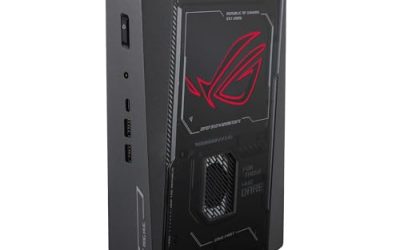
The ROG NUC is the pick for creators who want the newest platform in the smallest box here. Its listing pairs an Intel Core Ultra 9 275HX with an RTX 5070 Mobile GPU, 32GB of DDR5-6400 memory and a 1TB NVMe SSD, all inside a chassis just 2.22 inches thick that weighs 6.9 pounds. Thunderbolt 4 makes it easy to dock at a desk with monitors and fast external storage, then lift the machine away when the workspace changes. Triple-fan cooling and ARGB lighting complete a listing aimed squarely at small desks that still demand current-generation parts.
ASUS ROG G22CH DB779
- Best for: editors and streamers who want desktop-class GPU power in a slim tower.
- CPU: Intel Core i7-13700KF
- GPU: NVIDIA GeForce RTX 4070 (desktop)
- RAM: 32GB DDR5
- Storage: 1TB SSD Gen 4
editors and streamers who want desktop-class GPU power in a slim tower.
this is a 2023 model, so confirm current stock and that the DB779 configuration on the live listing still matches these specifications before ordering.
The G22CH takes the opposite route to compact power: instead of a mobile GPU, its listing specifies a desktop GeForce RTX 4070 alongside an Intel Core i7-13700KF, 32GB of DDR5 memory and a 1TB Gen 4 SSD. The tower is only 4.53 inches wide and 11.3 inches tall, so it stands beside a monitor where a normal mid-tower would crowd the desk. For creators whose effects, exports and games lean hard on the graphics card, that desktop-class card is the headline reason to choose this machine over the mini PCs in this roundup.
MSI Trident 3 11TC-067US
- Best for: shared living spaces where the PC must look like a console, not a tower.
- CPU: Intel Core i7-11700F
- GPU: NVIDIA GeForce RTX 3060 (ITX)
- RAM: 16GB DDR4
- Storage: 512GB SSD
shared living spaces where the PC must look like a console, not a tower.
the listing states Windows 10 Home, 16GB of DDR4 memory and a 512GB SSD, so check the current OS situation and plan storage headroom before ordering.
The Trident 3 is shaped like a games console rather than a PC tower, with a listing-stated volume of 4.72 litres and a flat profile that slides under a monitor stand or beside a television. Inside, the listing specifies an Intel Core i7-11700F, an ITX GeForce RTX 3060, 16GB of memory and a 512GB SSD, plus WiFi 6E and USB Type-C. That combination suits lighter creation work, photo editing and streaming far better than heavy 4K timelines, and the VR-Ready tag in the title underlines its living room leanings. It is the easiest machine here to hide in plain sight.
TOPGRO T1-MAX
- Best for: CPU-bound rendering, encoding and compiling work on a tight desk.
- CPU: Intel Core i9-13900HX, 24 cores / 32 threads, up to 5.4GHz
- GPU: GeForce RTX 4070, 8GB GDDR6
- RAM: 32GB DDR4
- Storage: 1TB PCIe 4.0 SSD
CPU-bound rendering, encoding and compiling work on a tight desk.
TOPGRO is a third-party mini-PC brand rather than a major OEM, so confirm the live buy option, the seller and the exact configuration on the listing before ordering.
The T1-MAX leads with processor muscle: its listing specifies a 13th-generation Intel Core i9-13900HX with 24 cores and 32 threads reaching up to 5.4GHz, which is the strongest CPU specification in this group for rendering and encoding queues. Around it sit an RTX 4070 with 8GB of GDDR6, 32GB of DDR4 memory and a 1TB PCIe 4.0 SSD. WiFi 6E, Bluetooth 5.3, HDMI 2.0 and DisplayPort 1.4 cover modern desk setups, and Windows 11 Pro is listed for those who need its remote and security features. RGB lighting finishes a mini PC built to work hard in very little space.
Corsair ONE i300
The i300 is the memory heavyweight of this roundup: its listing specifies 64GB of Corsair Vengeance DDR5, double the RAM of most rivals here, alongside an Intel Core i9-12900K and a GeForce RTX 3080 Ti. That mix suits creators whose projects sprawl across large photo libraries, layered design files and long timelines that punish smaller memory pools. Thunderbolt 4 handles fast external drives and docks, and Windows 11 Pro is listed. The compact tower format keeps all of it in a footprint far smaller than a conventional desktop with comparable headline specifications.
Specs
- CPU: Intel Core i9-12900K
- GPU: NVIDIA GeForce RTX 3080 Ti
- RAM: 64GB Corsair Vengeance DDR5
- Ports: Thunderbolt 4
- OS: Windows 11 Pro
- Form factor: compact Mini-ITX-based tower
Best for: RAM-heavy projects such as huge photo libraries and layered design files.
Watch out for: this is a 2022 model with no confirmed current stock, the retrieved listing data does not state storage capacity, and several i300 configurations exist, so confirm availability, storage and the exact configuration on the live listing before ordering.
ASIN: B09QMJXZ2S
Which One Fits Your Situation
Your Desk Has Almost No Spare Room
Measure the space first, then look at the ROG NUC (2025). At 2.22 inches thick and under seven pounds, it mounts the strongest space-saving case here while still listing 32GB of DDR5-6400 memory, a 1TB NVMe SSD and Thunderbolt 4 for a single-cable dock. The Trident 3 is the alternative when a flat, console-like shape fits your furniture better than a tall mini PC.
You Render or Encode Video Every Week
Sustained CPU work points to the TOPGRO T1-MAX, whose listing specifies a 24-core i9-13900HX, the highest core count in this group, backed by 32GB of memory and a 1TB PCIe 4.0 SSD for active projects. If your exports lean on GPU acceleration instead, the ROG G22CH and its desktop RTX 4070 deserve the closer look before you decide.
You Edit Photos and Lighter Video Between Games
A mixed workload does not need the flagship tier. The MSI Trident 3 pairs an RTX 3060 with an i7-11700F in a console-sized case, covering photo editing, streaming and moderate timelines while disappearing beside a television. Creators edging toward heavier timelines should step up to the 32GB machines, since the Trident’s 16GB and 512GB SSD are its clearest limits.
You Keep Many Large Files Open at Once
Choose the Corsair ONE i300 for its 64GB of DDR5 memory, the largest pool listed here, which keeps big libraries and layered files responsive when several applications share the machine. Pair that decision with patience: the model is older and stock needs confirming, so verify the live listing carefully, including the storage figure its data does not state, before committing.
Common Mistakes
- Assuming a compact PC’s graphics card matches the desktop card of the same name, when the listing actually specifies a mobile GPU with a tighter power budget.
- Ordering a 16GB machine for multitrack editing or large photo libraries, then discovering memory, not the processor, was the bottleneck all along.
- Clicking a sibling listing instead of the exact ASIN reviewed, since several of these models are sold in multiple memory and storage configurations.
- Ignoring the storage line entirely, including one listing here that does not state capacity, and finding the fitted drive too small for active projects.
- Shutting a compact desktop inside a closed cabinet, where restricted airflow undermines the cooling design during long renders.
Frequently Asked Questions
Can a small-form-factor desktop really handle 4K video editing?
Yes, provided the specifications match the workload. Look for a recent multi-core processor, at least 32GB of memory, a fast NVMe SSD and a GPU your editor can accelerate with, as listed on machines like the ROG NUC (2025) and ROG G22CH above. Very long timelines with heavy effects will still favour the strongest CPU and memory combination you can fit.
Is a mobile GPU in a mini PC weaker than a desktop GPU?
Generally yes. A mobile GPU shares its name with a desktop card but runs within a smaller power and cooling budget, so sustained performance in exports and renders is lower. Listings state the distinction plainly when you read them closely: the ROG NUC (2025) names an RTX 5070 Mobile, while the slim ROG G22CH tower lists a desktop RTX 4070.
How much RAM should a creator budget for in a compact desktop?
Treat 32GB as the working floor for serious editing, streaming and design, since it leaves room for the operating system and background tools alongside your main application. Step up to 64GB, as the Corsair ONE i300 lists, when projects involve very large photo libraries, layered files or several demanding applications running together for hours.
Can you upgrade a small gaming desktop later?
Only within limits. Some compact models allow memory or storage changes, but the graphics card in a mini PC is effectively fixed, and slim towers restrict card size and power supply choices. Because listings rarely promise upgrade paths, buy the GPU tier and memory capacity your next few years of projects need, and treat anything serviceable as a bonus.