Key takeaways
- Compare small-form-factor gaming desktops sold with 32GB of RAM, from a console-sized ASUS ROG to mini PCs, using only the specs in each Amazon listing.
Small gaming desktops split into two different products wearing the same label. One is a shrunken tower with a desktop graphics card inside; the other is a mini PC built around a mobile processor with integrated or laptop-class graphics. Your real decision is which of those you are actually buying, because both can honestly advertise 32GB of RAM while delivering very different frame rates, upgrade paths and desk footprints.


This guide is for buyers who want a compact machine that arrives with 32GB of memory already fitted, whether it sits beside a TV, on a crowded desk or in a dorm room. Each system below was selected from its Amazon listing, and the listing for every one states 32GB of RAM as part of the configuration, alongside the processor and storage it ships with.
Quick Picks
As an Amazon Associate we earn from qualifying purchases.
| Product | Best for | Key spec from title |
|---|---|---|
| ASUS ROG G22CH-DB779 | A console-sized tower with a desktop RTX 4070 inside | Intel Core i7-13700KF with 32GB DDR5 and 1TB SSD |
| AtomMan G7 Ti | The most processor and graphics power in a mini format | Intel Core i9-14900HX with RTX 4070 and 32GB DDR5 |
| MINISFORUM MS-A2 | Buyers who want a PCIe slot for their own graphics card | AMD Ryzen 9 8945HX with 32GB DDR5 and PCIe x16 slot |
| GMKtec Nucbox K6 | A small, quiet mini PC for lighter gaming and everyday speed | AMD Ryzen 7 7840HS with 32GB DDR5 and Radeon 780M |
How to Choose
Decide whether you need a desktop graphics card or integrated graphics
This is the fork in the road for the whole category. A small tower with a discrete card such as an RTX 4070 plays current games at high settings on a 1440p monitor. A mini PC with integrated graphics like the Radeon 780M handles esports titles and older games well but asks for lowered settings in demanding releases. The listing names the exact graphics hardware, so read that line before the processor name; a faster CPU cannot rescue a machine whose graphics are the bottleneck for the games you play.
Treat the 32GB figure as a configuration, not a headline
Listings for mini PCs often cover several memory and storage variants under one page. The configuration you want is the one whose title and spec table state 32GB, paired with the storage size you need, and the variant selector on the page must match it before you order. Also note the memory type where the listing states it: DDR5 in these systems. On the mini PCs, memory is usually in two slots, which matters later if you ever plan to move beyond the factory configuration.
Measure the box against where it will actually live
Small-form-factor covers everything from a tower roughly the size of a games console to a mini PC that fits behind a monitor. The ASUS in this guide lists dimensions of 4.53 by 12.72 by 11.3 inches, which is desk-tower territory, while the mini PCs are far smaller again. Check the stated dimensions in the listing against your shelf or desk space, and leave room around any machine for its vents. A compact case packed against a wall will run hotter and louder than the same machine with breathing space.
Check ports and wireless against your peripherals
Compact machines live or die by their connections. Look in the listing for the ports your setup needs: USB4 on the GMKtec, for example, is what lets a mini PC drive fast external storage or a dock over one cable, while the MINISFORUM’s PCIe slot is a different kind of expansion entirely. Wireless is stated too, and it differs between these listings from WiFi 6E to WiFi 7, which matters if the machine will game over a wireless network rather than a cable.
The 4 Best Options
ASUS ROG G22CH-DB779
The G22CH is the pick for buyers who want a genuine small tower rather than a mini PC. Its listing pairs an Intel Core i7-13700KF with an RTX 4070 graphics card, 32GB of DDR5 memory and a 1TB Gen4 SSD, inside a case listed at 4.53 by 12.72 by 11.3 inches. That combination suits a living-room or desk setup where a full tower will not fit but a discrete graphics card is non-negotiable. It is the most conventional gaming desktop here, shrunk rather than reimagined.
Specs
- Brand: ASUS ROG
- Model: G22CH-DB779
- Processor: Intel Core i7-13700KF
- Graphics: NVIDIA GeForce RTX 4070
- Memory: 32GB DDR5
- Storage: 1TB Gen4 SSD
- Dimensions: 4.53 x 12.72 x 11.3 inches
Best for: Gamers who want desktop-class graphics in a case that fits where a normal tower cannot.
Watch out for: Confirm the exact configuration on the listing before ordering, since this model line is sold in more than one processor and graphics combination.
AtomMan G7 Ti
The AtomMan G7 Ti takes the opposite route to similar performance: a mini PC built on Intel’s Core i9-14900HX mobile processor with an RTX 4070, 32GB of DDR5 and a 1TB SSD, with WiFi 7 listed among its connections. It is aimed at buyers who want the strongest hardware in the smallest box on this page, for a desk where even a slim tower feels bulky. The trade-off to accept is the mini PC form itself, where cooling and future upgrades are more constrained than in a tower case.
Specs
- Brand: AtomMan (MINISFORUM)
- Model: G7 Ti
- Processor: Intel Core i9-14900HX
- Graphics: NVIDIA GeForce RTX 4070
- Memory: 32GB DDR5
- Storage: 1TB SSD
- Wireless: WiFi 7
Best for: Buyers who want flagship-level parts in a mini PC that takes up almost no desk.
Watch out for: Check the listing’s stated configuration carefully, because mini PCs are commonly sold in barebones and lower-memory variants under similar names.
MINISFORUM MS-A2
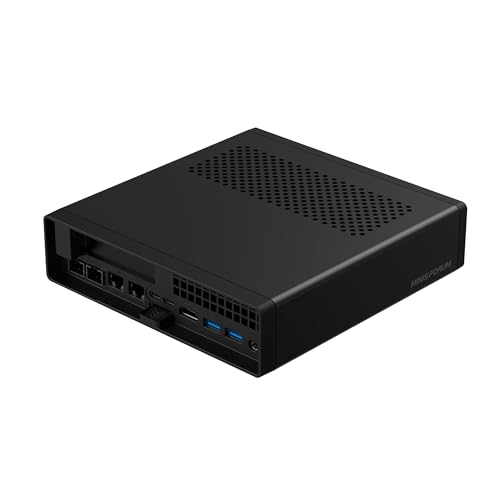
The MS-A2 is the flexible option. Its listing states an AMD Ryzen 9 8945HX processor, 32GB of DDR5 memory and a 1TB SSD, and the feature that defines it is a PCIe x16 slot, which gives the machine an expansion path the other mini PCs here do not offer. That makes it interesting for buyers who treat a small desktop as a small workstation as well as a gaming machine, or who already own hardware they want to install. It is less of an appliance and more of a compact platform.
Specs
- Brand: MINISFORUM
- Model: MS-A2
- Processor: AMD Ryzen 9 8945HX
- Memory: 32GB DDR5
- Storage: 1TB SSD
- Expansion: PCIe x16 slot
Best for: Technical buyers who want a compact machine they can expand with their own card.
Watch out for: The slot’s usefulness depends on the card’s size and power needs, so compare your intended card against the listing’s stated slot and chassis details first.
GMKtec Nucbox K6

The Nucbox K6 is the modest, sensible end of this list. The listing states an AMD Ryzen 7 7840HS processor with Radeon 780M integrated graphics, 32GB of dual-channel DDR5, a 1TB PCIe 4.0 SSD, USB4 and WiFi 6E. That is a fast everyday computer that also plays esports and lighter games without a discrete card, in a box small enough to mount out of sight. Choose it when your gaming is League, Valorant, indie titles and older releases, and your priority is a quiet, compact all-rounder.
Specs
- Brand: GMKtec
- Model: Nucbox K6
- Processor: AMD Ryzen 7 7840HS
- Graphics: AMD Radeon 780M integrated
- Memory: 32GB DDR5 dual-channel
- Storage: 1TB PCIe 4.0 SSD
- Ports: USB4
- Wireless: WiFi 6E
Best for: Light gaming and fast everyday computing in the smallest, simplest package here.
Watch out for: Integrated graphics set the ceiling for demanding games, so check the listing’s stated graphics against the titles you actually play before choosing it over a discrete-card model.
Which One Fits Your Situation
You play demanding new releases at high settings
Start with the two RTX 4070 machines. The ASUS G22CH gives you that graphics card in a small tower with a desktop processor, which is the safer long-term shape. The AtomMan G7 Ti matches the graphics in a far smaller mini PC body. Decide by the space you have and how much you value the tower’s roomier format over the mini PC’s footprint.
You want one small machine for work and play
The MINISFORUM MS-A2 is built for that overlap. Its Ryzen 9 processor and 32GB of memory handle heavy multitasking, and the PCIe slot keeps options open that sealed mini PCs close off. If your work involves a specific add-in card or a future graphics upgrade, this is the only listing here designed with that in mind.
Your gaming is esports, indies and older favourites
Save the desk space and choose the GMKtec Nucbox K6. The Radeon 780M is well matched to competitive and lighter titles, the 32GB of memory keeps the rest of the system snappy, and the whole machine can disappear behind a monitor. It only becomes the wrong choice if your library is full of recent, graphics-heavy releases.
Common Mistakes
- Reading “32GB RAM” in a headline and not checking which graphics hardware shares the listing, when graphics decide game performance.
- Ordering the wrong variant of a mini PC, because several memory and storage configurations sit under one product page.
- Assuming a small tower and a mini PC upgrade the same way; most mini PCs have limited internal expansion.
- Squeezing a compact gaming machine into a closed cabinet where its vents cannot breathe.
- Ignoring the wireless standard in the listing when the machine will game over WiFi rather than ethernet.
Frequently Asked Questions
Is 32GB of RAM enough for gaming in this class of machine?
Yes. Current games are comfortably served by 32GB, and the extra headroom helps when a game shares the machine with a browser, voice chat and recording tools. In these listings the limiting factor for frame rates is the graphics hardware, not memory, which is why the graphics line deserves more attention than the RAM figure.
What is the difference between the small tower and the mini PCs here?
The ASUS G22CH is a compressed desktop tower with a desktop processor and a discrete graphics card. The AtomMan, MINISFORUM and GMKtec are mini PCs built largely on mobile processors in much smaller cases. Both are legitimately small-form-factor; they differ in graphics power, expansion room and how they handle heat under long loads.
Can I upgrade one of these later?
It depends on the design. The MINISFORUM MS-A2 lists a PCIe x16 slot, which is a real expansion path. Sealed mini PCs typically allow limited memory and storage changes at most, and the small tower sits in between. Treat the listing’s stated configuration as the machine you are buying, and any upgrade as a bonus.
Do these systems come with the 32GB already installed?
The configurations featured here are the ones whose listings state 32GB of memory as part of the specification. Because sellers group variants together, confirm on the product page that the selected option shows 32GB before you check out, especially on the mini PC listings where barebones versions also exist.