Our Short List of 3
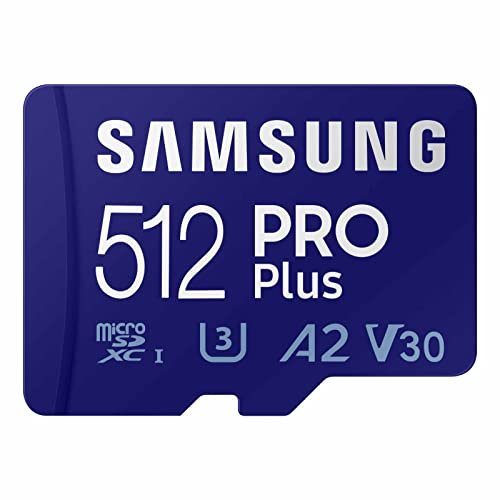
- Best for: Owners who keep large 4K video libraries and many apps on one card.
- Capacity: 512GB
- Form factor: microSDXC, UHS-I
- Read speed: up to 180 MB/s
- Write speed: up to 130 MB/s

- Best for: Everyday tablet expansion where one card must handle media, apps, and games.
- Capacity: 256GB
- Form factor: microSDXC, UHS-I
- Read speed: up to 160 MB/s
- Speed class: Class 10, U3, V30, A2

- Best for: Owners who want reliable everyday storage at a sensible capacity.
- Capacity: 256GB
- Form factor: microSDXC, UHS-I
- Read speed: up to 160 MB/s
- Speed class: Class 10, U3
All 5 Picks at a Glance
| Product | Specs | Action |
|---|---|---|
| Samsung PRO Plus 512GB |
| Check price on Amazon |
| Samsung EVO Select 256GB |
| Check price on Amazon |
| Samsung EVO Plus 256GB |
| Check price on Amazon |
 SanDisk Extreme 256GB |
| Check price on Amazon |
 SanDisk Ultra 256GB |
| Check price on Amazon |
Key takeaways
- Find the best memory for Samsung tablets with five microSD cards compared by capacity, speed class, app rating, and tablet compatibility for Galaxy Tab.
A Samsung tablet rarely runs out of room all at once. It fills up gradually, with downloaded shows for a flight, a growing photo library, offline maps for a road trip, and a handful of games that each demand more space than the last. The real decision is not simply buying the biggest card on the shelf. It is matching a card to the way the tablet gets used, so media stays ready offline, apps open without stuttering, and the card does not become the bottleneck every time a large file moves.
This guide is for Galaxy Tab owners who want dependable extra storage, from A-series owners who mainly watch downloaded video to S-series owners who record high-resolution footage and run games from the card. Every card below was chosen from the name and specifications shown on its Amazon product page, with capacity, speed class, and app-performance rating checked against the listing rather than assumed.
Quick Picks
As an Amazon Associate we earn from qualifying purchases
| Product | Best for | Key spec from title |
|---|---|---|
| Samsung PRO Plus 512GB | Large 4K libraries and heavy multitasking | Up to 180 MB/s read, 130 MB/s write |
| Samsung EVO Select 256GB | Everyday all-round tablet expansion | Up to 160 MB/s, UHS-I, U3, V30, A2 |
| Samsung EVO Plus 256GB | Reliable everyday storage with wide capacity choice | Up to 160 MB/s, UHS-I, U3, Class 10 |
| SanDisk Extreme 256GB | Apps, games, and fast file transfers | Up to 190 MB/s read, 130 MB/s write |
| SanDisk Ultra 256GB | Affordable Full HD media storage | Up to 150 MB/s read, UHS-I, A1 |
How to Choose
Check the tablet model before the card
Galaxy Tab models do not all accept the same card. Most recent models with a microSD slot support cards up to 1TB, while newer S-series models list support up to 2TB, and some tablets have no slot at all. Open Settings, then About tablet, and note the exact model number before ordering. Then check the official Samsung specification for that model to confirm both the slot and the maximum capacity. A card larger than the tablet supports will not give extra usable room, and a tablet without a slot needs a USB-C reader instead of any card in this guide.
Match capacity to the workload
Capacity matters more than headline speed for most tablet owners. A 256GB card holds a comfortable mix of downloaded films, photos, music, and games for everyday use, and it suits tablets that already carry a fair amount of built-in storage. A 512GB card fits owners who keep whole seasons of shows offline, shoot long stretches of video, or carry large game libraries without deleting titles to make room. Going larger only helps when the tablet supports it and the library genuinely needs the room; otherwise the extra capacity sits unused while a faster card at a smaller size would have served better.
Read the speed classes, not just the headline number
The letters printed on a card describe minimum sustained performance, and they matter more inside a tablet than the peak transfer figure on the box. U3 and V30 guarantee a 30 MB/s minimum sustained write, which keeps high-resolution video recording smooth. A1 and A2 ratings describe random read and write performance for apps, with A2 the stronger of the two. Peak read figures such as 160 MB/s or 190 MB/s are reached with a compatible reader under test conditions, and a tablet slot will usually deliver less. Choose the class marks for the workload first, then treat the peak figure as a secondary tiebreaker.
Buy a genuine card from a trustworthy listing
Counterfeit memory cards are common, and a fake card can report a capacity it does not have, then lose files once it fills past its real limit. Stick to established brands sold through the Amazon listing for the exact model number, and check that the model number on the listing matches the one printed on the card when it arrives. Format the card in the tablet before first use, and cards larger than 32GB should be formatted as exFAT, since Samsung tablets do not accept NTFS formatting on removable storage. Keep a backup of anything irreplaceable, because no card, however well made, replaces a second copy.
The 5 Best Options
Samsung PRO Plus 512GB
- Best for: Owners who keep large 4K video libraries and many apps on one card.
- Capacity: 512GB
- Form factor: microSDXC, UHS-I
- Read speed: up to 180 MB/s
- Write speed: up to 130 MB/s
Owners who keep large 4K video libraries and many apps on one card.
Confirm the tablet supports 512GB before ordering, since older models cap out lower.
The PRO Plus sits at the top of Samsung’s own microSD range, and the 512GB size makes it the natural pick for a tablet that doubles as a media library and a camera companion. Its A2 rating suits apps and games stored on the card, while the U3 and V30 marks keep high-resolution video recording steady. Owners who travel with large offline collections will appreciate the room, and the included SD adapter makes moving files through a laptop straightforward when the tablet is not nearby.
Samsung EVO Select 256GB
- Best for: Everyday tablet expansion where one card must handle media, apps, and games.
- Capacity: 256GB
- Form factor: microSDXC, UHS-I
- Read speed: up to 160 MB/s
- Speed class: Class 10, U3, V30, A2
Everyday tablet expansion where one card must handle media, apps, and games.
The rated read speed needs a compatible reader; the tablet slot itself will run slower.
The EVO Select is Samsung’s mainstream card, sold through Amazon, and the current generation raises the rated read speed to up to 160 MB/s. It carries the same U3, V30, and A2 marks as the fastest cards in this guide, so its certified floors for sustained writes and app performance match theirs. Samsung lists it explicitly for smartphones and tablets, and the included adapter helps when managing a media library from a computer. For most Galaxy Tab owners, this is the balanced middle ground between everyday value and genuinely strong performance.
Samsung EVO Plus 256GB
- Best for: Owners who want reliable everyday storage at a sensible capacity.
- Capacity: 256GB
- Form factor: microSDXC, UHS-I
- Read speed: up to 160 MB/s
- Speed class: Class 10, U3
Owners who want reliable everyday storage at a sensible capacity.
It lacks the V30 and A2 marks of the faster cards, so heavy app use is better served elsewhere.
The EVO Plus is the dependable workhorse of Samsung’s range, aimed at owners who want solid storage without paying for flagship speed. The current generation is rated at up to 160 MB/s read, with U3 and Class 10 marks and a UHS-I interface, which is ample for Full HD and 4K video playback, photo libraries, and offline downloads. It comes in capacities from 64GB to 1TB, so the same card family can serve a lightly used tablet or one that carries a large media collection. The included adapter and the long warranty round out a card built to stay in the slot for years.
SanDisk Extreme 256GB
- Best for: Games and apps that run from the card, plus fast transfers of large files.
- Capacity: 256GB
- Form factor: microSDXC, UHS-I
- Read speed: up to 190 MB/s
- Write speed: up to 130 MB/s
Games and apps that run from the card, plus fast transfers of large files.
The top read speed needs a QuickFlow-compatible reader; a tablet slot will not reach it.
The SanDisk Extreme is the fastest card in this guide on paper, rated at up to 190 MB/s read and up to 130 MB/s write through SanDisk QuickFlow technology. Its A2 rating certifies the strongest random-access performance here, which matters when games or apps run directly from the card rather than from internal storage. The U3 and V30 marks guarantee smooth high-resolution video capture, and the card is shockproof, temperature-proof, waterproof, and X-ray-proof. It ships with a full-size SD adapter for moving files through a laptop slot.
SanDisk Ultra 256GB
- Best for: Affordable storage for downloaded shows, photos, and music.
- Capacity: 256GB
- Form factor: microSDXC, UHS-I
- Read speed: up to 150 MB/s
- Speed class: Class 10, U1, A1
Affordable storage for downloaded shows, photos, and music.
Its U1 rating is not suited to sustained high-resolution video recording; choose a U3 card for that.
The SanDisk Ultra is the straightforward choice for owners whose tablet mainly stores media. Its A1 rating covers app performance at a basic level, while the U1 and Class 10 marks suit Full HD video and everyday downloads. The rated read speed of up to 150 MB/s keeps large file copies moving, and the card works with the SanDisk Memory Zone app for backing up and organising photos. It is the least demanding card in this guide, and that is exactly the point: it does the common jobs well without asking the buyer to pay for performance the tablet will never use.
Which One Fits Your Situation
You mainly watch downloaded shows and store photos
Pick the SanDisk Ultra 256GB. Its capacity covers a healthy offline library, its A1 rating handles the occasional app, and its Full HD support matches what most downloaded video needs. There is no reason to pay for A2 or V30 marks when the card will rarely record video or run demanding games.
You run games and apps from the card
Pick the SanDisk Extreme 256GB. The A2 rating gives the strongest random-access performance in this guide, and the U3 and V30 marks keep large game files and high-resolution video moving without stutter. The 190 MB/s rated read speed also shortens transfers when the card is read through a compatible reader.
You want one Samsung card that does everything well
Pick the Samsung EVO Select 256GB. It matches the Extreme on U3, V30, and A2 marks, carries a 160 MB/s rated read speed, and is sold by Samsung explicitly for tablets. It is the safe middle choice when the tablet handles a mix of media, apps, and occasional recording, and it avoids paying for flagship speed the tablet may never use.
You carry a very large media library
Pick the Samsung PRO Plus 512GB. Twice the room of the 256GB cards in this guide means whole seasons, long trips, and large photo collections fit without constant deleting. Its A2 rating and V30 mark keep that large library usable, not merely stored, and the 10-year warranty suits a card that will live in the tablet for years.
Common Mistakes
- Buying a card larger than the tablet supports, then discovering the extra capacity is unusable.
- Choosing a full-size SD card instead of microSD, which does not fit the tablet tray.
- Judging a card by its peak transfer figure alone, while ignoring the U3, V30, and A2 marks that govern real tablet use.
- Formatting a card larger than 32GB as NTFS, which Samsung tablets do not accept on removable storage.
- Storing the only copy of irreplaceable photos on a card with no backup anywhere else.
Frequently Asked Questions
Do all Samsung tablets accept microSD cards?
No. Most Galaxy Tab models with a slot accept microSDXC cards, but some models have no expandable storage at all, and maximum capacity varies by model. Check Settings, then About tablet, for the exact model number, and confirm the slot and the capacity limit in the official Samsung specification before buying.
Can a microSD card replace the tablet internal storage?
Not fully. Samsung tablets do not support adoptable storage, so the card cannot become true internal storage and not every app can be moved to it. Media, downloads, photos, and many games can live on the card, but the system and some apps must stay on internal storage.
What size card should most tablet owners buy?
A 256GB card suits most owners, covering downloaded video, photos, music, and a reasonable set of games. Owners who keep whole seasons offline, record long video, or carry very large game libraries should consider 512GB, provided the tablet supports it.
Does a faster card make the tablet itself faster?
Only up to a point. A faster card shortens file transfers and helps apps stored on the card load more smoothly, but the tablet slot has its own speed ceiling. Peak figures on the box are reached with a compatible reader, so the certified speed classes matter more than the headline number inside the tablet.