Our Short List of 3

- Best for: Serious gaming in the smallest box that still carries a discrete graphics card.
- Intel Core Ultra 7 155H processor
- NVIDIA GeForce RTX 4060 discrete graphics
- 16GB DDR5 memory
- 1TB PCIe Gen4 NVMe SSD

- Best for: Memory and storage upgrades on a small desk, with a strong processor for work and lighter games.
- AMD Ryzen 9 7940HS processor, 8 cores and 16 threads, up to 5.2 GHz
- AMD Radeon 780M integrated graphics
- 32GB DDR5 memory, dual-channel SODIMM slots, maximum 64GB
- 1TB SSD, two M.2 2280 PCIe 4.0 slots

- Best for: Quiet everyday gaming and desk work in a compact metal chassis.
- AMD Ryzen 7 8845HS processor, 8 cores and 16 threads, up to 5.1 GHz
- AMD Radeon 780M integrated graphics
- 32GB DDR5 memory, two SODIMM slots
- 1TB M.2 PCIe 4.0 SSD, two M.2 slots
All 3 Picks at a Glance
| Product | Specs | Action |
|---|---|---|
| ASUS ROG NUC 760 |
| Check price on Amazon |
| MINISFORUM Venus UM790 Pro |
| Check price on Amazon |
| Beelink SER8 |
| Check price on Amazon |
Key takeaways
- Compare the best small-form-factor gaming desktops for upgrades, from discrete-GPU mini PCs to compact towers with room for more memory and storage.
A small gaming desktop has to solve two problems at once: it must fit a desk and leave room to grow. The machines in this guide do both, but they do it in different ways. A mini PC with a discrete graphics card plays games in a paperback-sized box, while a compact tower gives you a full-size graphics card and standard parts you can swap later. The real decision is which kind of growth matters most: more memory and storage now, a stronger graphics card later, or a machine that takes up less space while you decide.
This guide is for gamers moving from a laptop to a desktop, for desk workers who need a small machine that can still play after hours, and for buyers who want to start modest and improve the machine over time. The four desktops below were chosen from the names and specifications on their Amazon listings, covering discrete-graphics mini PCs, an integrated-graphics mini PC, and a compact tower.
Quick Picks
As an Amazon Associate, we earn from qualifying purchases.
| Product | Best for | Key spec from title |
|---|---|---|
| ASUS ROG NUC 760 | Serious gaming in the smallest box | Core Ultra 7 155H with RTX 4060 graphics |
| MINISFORUM Venus UM790 Pro | Memory and storage upgrades on a small desk | Ryzen 9 7940HS with 32GB DDR5 and 1TB SSD |
| Beelink SER8 | Quiet everyday gaming and desk work | Ryzen 7 8845HS with 32GB DDR5 and 1TB SSD |
| HP Victus 15L TG02 | A compact tower you can grow into | Intel Core i5-14400F with RTX 3050 graphics |
How to Choose
Start with the graphics: discrete or integrated
A discrete graphics card does the heavy lifting in games, and it is the single biggest difference between the machines in this guide. The ASUS ROG NUC 760 and the HP Victus 15L carry discrete cards, an RTX 4060 and an RTX 3050, which handle modern games at smooth frame rates. The MINISFORUM UM790 Pro and the Beelink SER8 rely on Radeon 780M integrated graphics, which play lighter games well and handle older titles, but ask you to lower settings in demanding new releases. If gaming is the main job, start with a discrete card. If the machine is mostly for work with gaming on the side, integrated graphics in a smaller box can be enough.
Check what you can actually change later
Small does not always mean sealed, but the upgrade path is different on every chassis. The mini PCs here open up for memory and storage: the UM790 Pro has two DDR5 SODIMM slots and two M.2 slots, and the SER8 has the same pair, so you can add memory or a second drive without replacing the machine. Only the HP Victus 15L, a compact tower, gives you a realistic path to a stronger graphics card later, since its discrete card sits in a standard slot. Before you buy, check the listing for the number of memory and M.2 slots, because a machine with one free slot is a very different purchase from one with none.
Measure the space and the airflow
A small desktop earns its place by fitting where a tower cannot, but the same small size makes airflow harder. Check the dimensions on the listing and measure the shelf or desk space, leaving room behind the machine for cables and warm air to escape. The ROG NUC 760 ships with a vertical stand, so it can stand on its edge, while the UM790 Pro and SER8 sit flat and need clear space on top for their vents. The Victus 15L is the largest machine here at about 13 inches deep, so it needs a real desk corner rather than a shelf. A machine that runs hot slows itself down to stay cool, so leave breathing room around every vent.
Match memory and storage to the games you play
Memory and storage decide how many games and apps can live on the machine at once. Sixteen gigabytes of memory is enough for most current games, and it is what the ROG NUC 760 ships with, while 32 gigabytes gives you headroom for streaming, browser tabs, and background apps. Storage matters just as much: a 512 gigabyte drive fills up fast once you install two or three large games, while a 1 terabyte drive, standard on all four machines here, gives you room for a small library. If you like to keep many games ready to play, pick a machine with a second M.2 slot so you can add another drive later instead of deleting games to make room.
The 4 Best Options
ASUS ROG NUC 760
- Best for: Serious gaming in the smallest box that still carries a discrete graphics card.
- Intel Core Ultra 7 155H processor
- NVIDIA GeForce RTX 4060 discrete graphics
- 16GB DDR5 memory
- 1TB PCIe Gen4 NVMe SSD
Serious gaming in the smallest box that still carries a discrete graphics card.
The graphics card is a laptop-class RTX 4060, not a full desktop card, and it cannot be swapped for a different card later, so memory and storage are the upgrades to plan for.
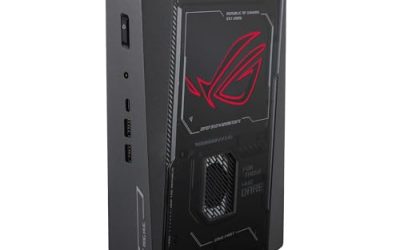
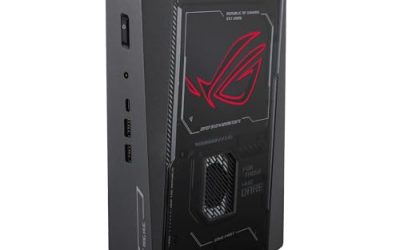
The ROG NUC 760 is the strongest gaming machine in this guide, and the smallest one with a discrete graphics card. Its Core Ultra 7 processor and RTX 4060 graphics sit in a chassis of about 2.5 liters, so it fits on a desk or a shelf, and the included vertical stand lets it stand upright. It arrives with 16 gigabytes of DDR5 memory and a 1 terabyte drive, and both can be changed later, which matters for buyers who want to improve it over time. Thunderbolt 4 and Wi-Fi 6E round out a machine built for a modern desk.
Watch out for: The graphics card is a laptop-class RTX 4060, not a full desktop card, and it cannot be swapped for a different card later, so memory and storage are the upgrades to plan for.
MINISFORUM Venus UM790 Pro
- Best for: Memory and storage upgrades on a small desk, with a strong processor for work and lighter games.
- AMD Ryzen 9 7940HS processor, 8 cores and 16 threads, up to 5.2 GHz
- AMD Radeon 780M integrated graphics
- 32GB DDR5 memory, dual-channel SODIMM slots, maximum 64GB
- 1TB SSD, two M.2 2280 PCIe 4.0 slots
Memory and storage upgrades on a small desk, with a strong processor for work and lighter games.
This listing is the fully configured 32GB and 1TB build, so check the style name before ordering, since the same model is also sold as a barebone kit without memory or storage.
The UM790 Pro is the most flexible mini PC for upgrades. Its Ryzen 9 7940HS processor pairs eight cores with Radeon 780M integrated graphics, and it arrives with 32 gigabytes of DDR5 memory and a 1 terabyte drive. The two SODIMM slots take up to 64 gigabytes of memory, and the two M.2 slots take a second drive, so the machine can grow with your library. Four USB 3.2 ports, two USB4 ports, and two HDMI 2.1 outputs cover a multi-screen desk, with Wi-Fi 6E and Bluetooth 5.3. It is the pick for buyers who want a tiny box with a long upgrade runway.
Watch out for: This listing is the fully configured 32GB and 1TB build, so check the style name before ordering, since the same model is also sold as a barebone kit without memory or storage.
Beelink SER8
- Best for: Quiet everyday gaming and desk work in a compact metal chassis.
- AMD Ryzen 7 8845HS processor, 8 cores and 16 threads, up to 5.1 GHz
- AMD Radeon 780M integrated graphics
- 32GB DDR5 memory, two SODIMM slots
- 1TB M.2 PCIe 4.0 SSD, two M.2 slots
Quiet everyday gaming and desk work in a compact metal chassis.
The SER8 is sold in several configurations with the same name, so confirm the processor and the memory size on the listing before ordering, since the 8745HS version looks nearly identical.
The SER8 is the quiet achiever of this group, a compact mini PC that stays calm under load. Its Ryzen 7 8845HS processor and Radeon 780M graphics handle everyday work and lighter games, and it arrives with 32 gigabytes of DDR5 memory and a 1 terabyte drive. Two SODIMM slots and two M.2 slots mean the memory and storage can both grow later, and triple-display support through HDMI 2.1, DisplayPort, and USB4 suits a wide desk setup. It is the pick for buyers who want one small machine for workdays and game nights alike.
Watch out for: The SER8 is sold in several configurations with the same name, so confirm the processor and the memory size on the listing before ordering, since the 8745HS version looks nearly identical.
HP Victus 15L TG02
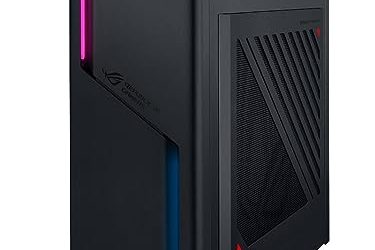
The Victus 15L is the only compact tower here, and the one to pick if you plan to change the graphics card one day. Its Intel Core i5-14400F processor and RTX 3050 graphics with 6 gigabytes of dedicated memory play modern games well, and the 32 gigabytes of DDR4 memory and 1 terabyte drive mean it arrives ready. At about 13 inches deep and 6 inches wide, it is bigger than the mini PCs here, but far smaller than a full tower, and its standard layout makes future graphics upgrades realistic. The listing is a bundle that includes a mechanical gaming keyboard, so the desk is covered.
Specs
- Intel Core i5-14400F processor, up to 4.6 GHz, 10 cores
- NVIDIA GeForce RTX 3050 graphics, 6GB dedicated memory
- 32GB DDR4-3200 memory
- 1TB PCIe NVMe SSD
- Windows 11 Home
- Dimensions 13.27 x 6.1 x 11.71 inches
- Bundle includes a Machenike K500B mechanical gaming keyboard
Best for: A compact tower you can grow into, with a real path to a stronger graphics card later.
Watch out for: This listing is a bundle with a keyboard, and the memory is DDR4 rather than DDR5, so check the bundle contents and the memory type before ordering.
Which One Fits Your Situation
You are moving from a gaming laptop
Pick the ASUS ROG NUC 760. It gives you the jump in graphics power you expect from a desktop, with an RTX 4060 in a paperback-sized box, and it takes up far less desk space than a tower. The 16 gigabytes of memory and 1 terabyte drive are a solid start, and both can be changed later when you want more. Set it upright on its stand and it reads as a small console.
You want the smallest box that still plays
Pick the MINISFORUM UM790 Pro. It is one of the smallest machines here, and its Ryzen 9 processor and 32 gigabytes of memory handle work and lighter games with ease. The two memory slots and two M.2 slots mean you can double the memory and add a second drive later, so the machine grows instead of being replaced. If your games are mostly older titles and lighter fare, this is the tidiest desk setup in the guide.
You plan to upgrade the graphics card one day
Pick the HP Victus 15L TG02. It is the only machine here where a graphics card swap is realistic, because the RTX 3050 sits in a standard slot inside a tower chassis. The 32 gigabytes of memory and 1 terabyte drive mean you will not need to touch anything else for a while, and when the time comes, the graphics card is the part to change. The included keyboard is a useful bonus for a first desktop setup.
You want a quiet desk machine that doubles as a work PC
Pick the Beelink SER8. It is built to stay quiet under load, and its Ryzen 7 processor and 32 gigabytes of memory handle spreadsheets, calls, and browser tabs without fuss, then switch to games after hours. Triple-display support means it can drive a wide work setup, and the two memory slots and two M.2 slots leave room to grow. It is the best fit when the machine has to be a work computer first and a gaming machine second.
Common Mistakes
- Buying a mini PC for demanding games without checking whether its graphics are integrated or discrete.
- Choosing a machine with no free memory slot, then finding out later that the memory cannot grow.
- Placing a small desktop against a wall or inside a closed shelf, blocking the vents it needs to stay cool.
- Filling a 512 gigabyte drive with two large games and then having to delete games to install new ones.
- Ordering a barebone kit by mistake when you meant to buy the fully configured version with memory and storage included.
Frequently Asked Questions
Can a mini PC with integrated graphics run modern games?
Yes, within limits. The Radeon 780M in the UM790 Pro and the SER8 handles lighter games and older titles well, and it manages newer games at lower settings and modest resolutions. For smooth play in demanding new releases at high settings, a discrete card like the RTX 4060 in the ROG NUC 760 or the RTX 3050 in the Victus 15L is the safer choice.
Can I add more memory to these desktops?
Yes, all four machines in this guide have memory slots you can change. The UM790 Pro takes up to 64 gigabytes across its two SODIMM slots, the SER8 and ROG NUC 760 also have two SODIMM slots, and the Victus 15L has standard desktop memory slots. Check the listing for the number of slots and the memory type, since DDR4 and DDR5 are not interchangeable.
Do small desktops overheat?
They can if they have nowhere to breathe. Small chassis pack hot parts into little space, so they depend on clear vents and steady airflow. Leave space behind and above the machine, keep it out of closed cabinets, and dust the vents now and then. A machine that runs hot will slow itself down to protect its parts, so airflow is part of performance.
Is a compact tower better than a mini PC for upgrades?
A compact tower like the Victus 15L has room for a standard graphics card you can swap later. Mini PCs like the ROG NUC 760, UM790 Pro, and SER8 suit memory and storage upgrades better, since their SODIMM and M.2 slots are easy to reach, but their graphics cannot change. Pick the tower if the graphics card is the part you expect to change.